Rebar-Point Pattern
Place a single rebar at a time either by entering the coordinates into the table or by mouse-click on the model view.
From the Main Menu select Model > Rebar > Rebar-Point Pattern.
Right Click  and Select Add under the Section > Main Reinforcement in the Works Tree.
Click  Point Pattern in the Icon Menu.
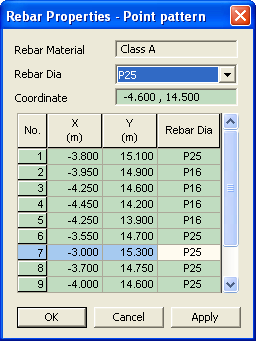
Rebar-Point Pattern
 Rebar Material
The material defined by the user in Model>Rebar>Rebar Material Property is assigned to all the rebars.
Rebar Dia
Select the rebar diameter from the drop down list. The rebar set is as per the country code specified in Model>Rebar>Rebar Material Property.
 Coordinate
Enter the coordinates of the rebar and click  .
.
Note
The rebar table is Microsoft Excel compatible.