Model: Dynamic Curve Function

Function
Enters the time history load for the seismic analysis of the ground
Call
1D Equivalent Linear Analysis Module : Model > Ground Acceleration
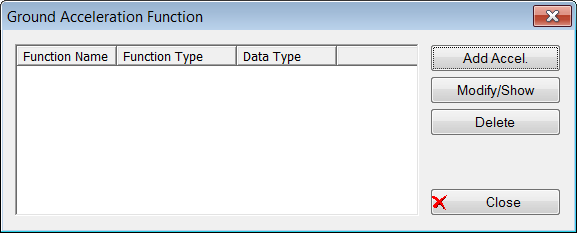
<Dynamic Curve Function>
Add Accel.
Enter the new acceleration data
Modify/Show
Check and modify the inputted data
Delete
Delete the inputted data

Export
Export the ground acceleration function to 'txt' format. The data of FFT(Fast Fourier transform) also can be checked with 'txt' format.
Function Name
Select the time history analysis conditions inputted in the function.
Click the button to call the function if it
has not been inputted already
Time Forcing Data Type
Normalized Accel.
The acceleration spectrum has been divided by the gravity acceleration, thus it cannot be set to other types
Scaling
Enter the scale factor of the Ground Acceleration Function
Scale Factor
Enter the scale factor
Maximum Value
Modify the spectrum data so that the maximum
acceleration fits the value desired by the user
Gravity
Enter the gravity acceleration
Graph Options
Assign whether or not the Graph will be displayed as a log Scale by axis-direction
Description
Enter a brief description that explains
the Ground Acceleration Function. When
the default values for seismic waves generation is used for  generation, the applied maximum acceleration and period are
displayed.
generation, the applied maximum acceleration and period are
displayed.
In FFA, for the user's convenience, the following 3 time history load entry methods are provided. For the seismic load input, the value for the time history acceleration divided by gravity acceleration is supported only.
Saving the file and retrieving the frequently used time history load
Accessing the time history load data stored in the database
The user directly entering the data
1. Saving the file and retrieving the frequently used time history load
 : This is
used when a time history load is inputted from a data created, and the
data creates the file extension as ".sgs" or ".thd"
format as described below.
: This is
used when a time history load is inputted from a data created, and the
data creates the file extension as ".sgs" or ".thd"
format as described below.
'fn.sgs' File Format
|
*SGSw |
A proclamation stating that this file is a "Seismic Data Generator" (seismic data auto extraction module) data format of MIDAS/Civil |
|
*TITLE, Elcentro 1940, N-S Component |
- |
|
*X-AXIS, Second |
- |
|
*Y-AXIS, Normalized Acceleration |
- |
|
*UNIT&TYPE, GRAV, ACCEL |
- |
|
*FLAGS, 0, 0 |
- |
|
*DATA |
- |
|
1.00000E-010, 3.50102E-001 |
- |
|
5.00000E-002, 3.82861E-001 |
- |
|
1.00000E-001, 5.08226E-001 |
- |
|
1.50000E-001, 5.17459E-001 |
- |
|
: |
- |
'fn.thd' File Format - Input by user
|
Optional |
** Comments - Entry allowed anywhere |
|
- |
*UNIT, M , N - length : MM, CM, M, INCH, FEET, GRAV possible |
|
|
*Load : KG, TON, KN, LBF, KIP |
|
- |
*TYPE, ACCEL - ACCEL, FORCE, MOMENT possible |
|
Required |
*Data |
|
- |
X1 , Y1 (X : Time, Y : Time Function) |
|
- |
X2 , Y2 |
|
- |
X3 , Y3 |
|
- |
: |
2. Accessing the time history load data stored in the MIDAS/Civil database
: A function creating
the time history load by retrieving various seismic data from the database.
A total
of 32 different seismic accelerations are stored in the database.
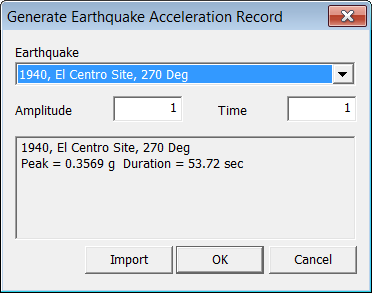
<Earthquake>
3. Directly entering data in the Add/Modify/Ground Acceleration Functions dialog box
The time history load can be formulated by directly entering the time history load values in the fields on the left of the dialog box.