Function
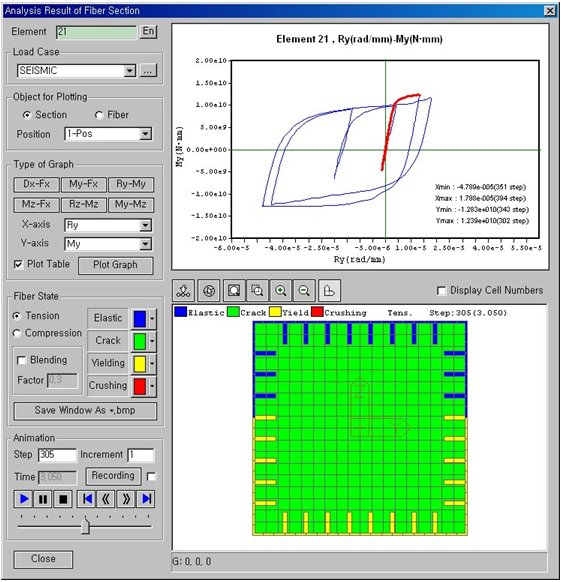
Analysis results of fiber sections from time history analysis are displayed. The results consist of member force history of inelastic beam members modeled with fiber elements, stress – strain results of each section cell, and the state of fibers.
Call
From the Main Menu select Results > Time History Results > Analysis Result of Fiber Section
Select Results > Time History Results > Analysis Result of Fiber Section in the Menu tab of the Tree Menu.
Usage
 Element
Enter a beam element number modeled with fibers. Analysis results of the fiber model defined within the element are produced.
Load case
Select a time history analysis case defined in Time History Load Cases.
Object for Plotting
Section: Plot the analysis results of the entire section of the selected element.
Fiber: Plot the analysis results of each cell of the selected element.
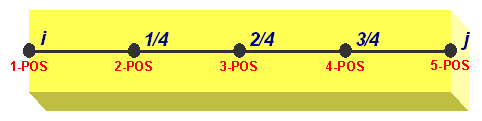
Position: Select the positions in the element local x-direction where the results are required. 5 Positions including i and j ends can be selected as shown in the following figure.
Type of Graph
Define the types of X and Y axis of the results output.
If Section is selected
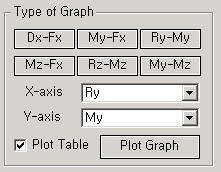
X-axis can be defined for Dx, Ry, Rz, Fx, My, Mz, and Time. Y-axis can be defined for Dx, Ry, Rz, Fx, My and Mz. For 6 most frequently used combinations of components, selection can be made by the use of the buttons provided.
|
|
Dx-Fx: Displacement – Axial force in the ECS x-axis direction My-Fx: Moment about the ECS y-axis – Axial force in the ECS x-axis direction Ry-My: Curvature about the ECS y-axis - Moment about the ECS y-axis Mz-Fx: Moment about the ECS z-axis – Axial force in the ECS x-axis direction Rz-Mz: Curvature about the ECS z-axis - Moment about the ECS z-axis My-Mz:
Moment about the ECS y-axis - Moment about the ECS z-axis |
If Fiber is selected
|
|
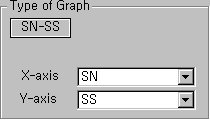
Time: Time SN: Strain SS: Stress |
Plot Table: Generate the time history analysis results in a table format.
.bmp)
.bmp) : Display
the graph based on the assigned axes.
: Display
the graph based on the assigned axes.
 : Select
cells.
: Select
cells.
 : Unselect
all the selected cells.
: Unselect
all the selected cells.
 : Display
all the cells.
: Display
all the cells.
 : Zoom the
selected screen display
: Zoom the
selected screen display
 : Zoom in
the screen
: Zoom in
the screen
 : Zoom out
the screen
: Zoom out
the screen
 : Turn on/off
the axis.
: Turn on/off
the axis.
Display Cell Numbers
Note
Fiber Cells are assigned numbers according to the following rules:
Numbering order for materials: from Concrete Cell to Steel Cell
Numbering order for directions: 1. from left to right, 2. from up to down
Note
z and y axes displayed in the Fiber Section Animation window represent the element local z and –y axes, respectively (looking at the member from the I-end of the member).
Fiber State
Specify the state of the output display for the fiber model.
Tension: Display the analysis results of the tension side.
Compression: Display the analysis results of the compression side.
Elastic, Crack, Yielding, Crushing: Select colors for each fiber state
Blending: Define the intensity of the display colors.
Time Step: Select a time history step at which analysis results will be produced.
 : Initialize
the fiber model.
: Initialize
the fiber model.
 : Plot the
analysis results of the fiber model.
: Plot the
analysis results of the fiber model.
 : Graphical
data for analysis results can be saved in the Windows Bitmap (BMP) file
format.
: Graphical
data for analysis results can be saved in the Windows Bitmap (BMP) file
format.
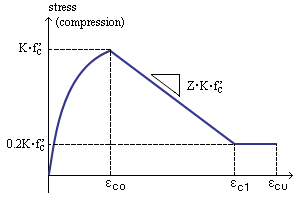
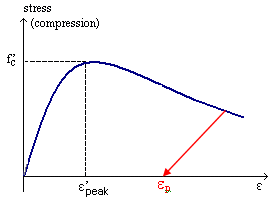
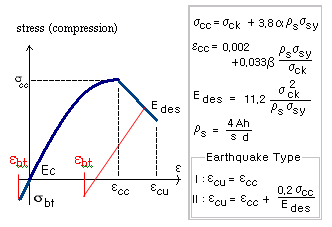
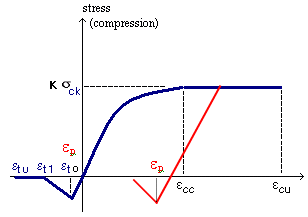
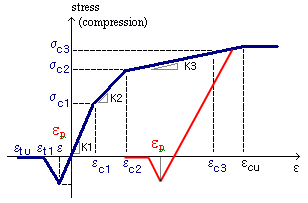
Fiber State definition is different for reinforcing steel and concrete and for each material model. Definition of Fiber State is as follows:
|
| ||||||||||||||||||||||||||||||||||||||||||||||||||||||||||||||||||
|
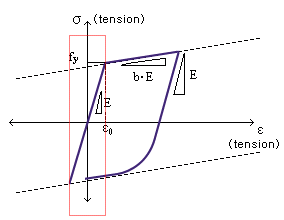
Menegotto-Pinto Model
Elastic within the rectangle zone and Yielding elsewhere
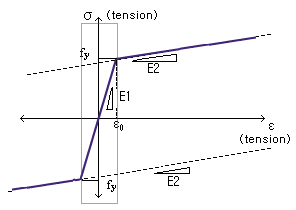
Bilinear Model
Elastic within the rectangle zone and Yielding elsewhere
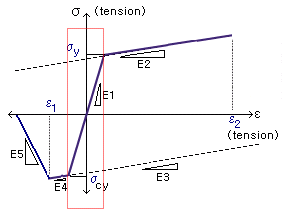
Unsymmetric Bilinear Model
Elastic within the rectangle zone and Yielding elsewhere
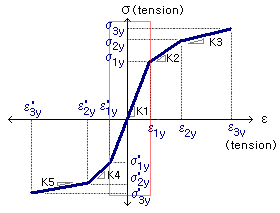
Trilinear Model
Elastic within the rectangle zone and Yielding elsewhere
|
Kent & Park Model
Japan Concrete Standard Specification Model
Japan Roadway Specification Model
Japan Highway Corporation Model
Trilinear Concrete Model
|
Animation
Select the time history step at which the analysis results need to be produced.
|
|
Step: Specify the step at which the time history analysis results need to be displayed. If a specific step is entered, it moves to the step directly. Increment: Graphic output is produced and recorded at the specified increment. Time: The actual time of the loading corresponding to the current step is produced.
|
.bmp)
.bmp)
.bmp)
.bmp)
.bmp)
.bmp)
.bmp)
.bmp)
.bmp)
.bmp)
.bmp)
.bmp)
.bmp)
.bmp)
.bmp)
.bmp)
.bmp)
.bmp)
.bmp)
.bmp)
 : It auto-generates the animated
results of time history analysis. The interval of display is at the specified
Increment.
: It auto-generates the animated
results of time history analysis. The interval of display is at the specified
Increment. : Pause Animation generation.
 : Stop Animation generation.
 : Moves to the first step
of the time history analysis result.
: Moves to the first step
of the time history analysis result.  : Move backward to the previous
steps by the increment.
: Move backward to the previous
steps by the increment.  : Move forward to the subsequent
steps by the increment.
: Move forward to the subsequent
steps by the increment.  : Move to
the last step of the time history analysis results.
: Move to
the last step of the time history analysis results.