Based on a lateral load case, displacement
participation by each element for each force component (Axial, Torsional,
Moment-y, Moment-z, Shear-y & Shear-z) can be checked in Contour and
Value. In order to check the displacement participation factor, a unit
load needs to be input in
the direction of the lateral load at the location of the maximum displacement.
Call
From the Main Menu select Results > Displacement
Participation Factor.
Select Results
> Displacement
Participation Factor in the Menu
tab of the
Tree Menu.
Usage
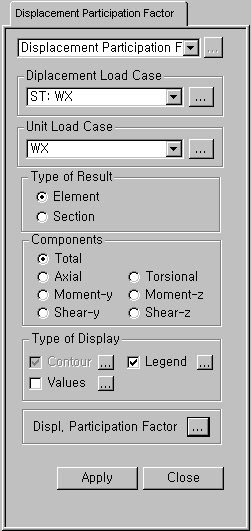
Displacement Load Case
Select a desired lateral load case for which
we wish to investigate the displacement participation factors of the elements/sections.
Click to the right to add new or modify/delete previously
defined load cases. (Refer to Load
Cases.)
Unit
Load Case
Select a unit load case, which is applied
at the location of the maximum lateral displacement. Displacement participation
factors of the elements/sections are relative to the location and direction
of the unit load.
Click to the right to add new or modify/delete previously
defined load cases. (Refer to Load
Cases.)
Type
of Results
Element:
Displacement participation factors by elements
Note
Displacement participation factors by elements are calculated as follows:
where,
: Displacement
participation by each element
:
Each displacement component of each element
: Weight
of each element
Section: Displacement participation factors by section
properties
Note
Similarly, displacement participation factors by section properties are
calculated as follows:
where,
: Displacement
participation by each section property
m :
Number of elements having identical section properties
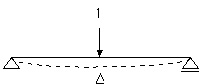
Let us take an example of a simply supported
beam, which exhibits a deflection of Δ under the external load L (Fig.
1a). We then apply a unit load at the location of Δ (Fig. 1b) in the same
direction of Δ
(a) (b)
Fig.
1 Unit load method
The external virtual work
( ) in Fig. 1b is expressed as
The deflection Δ due to the
external load L in Fig. 1a can be expanded into axial deformation , flexural deformation , shear deformation
and
torsional deformation . And the internal force in the simple
beam due to the unit load is consisted of . The internal
virtual work done by the unit load to cause the deformation Δ becomes
If the above beam behaves
linearly, and we define the internal forces caused by the external load
L as , the deformation of the beam element becomes
We
then apply the principle of virtual work, ( ), to derive
the equation of the unit-load method.
where,
: shape factor for shear
Expanding the concept of
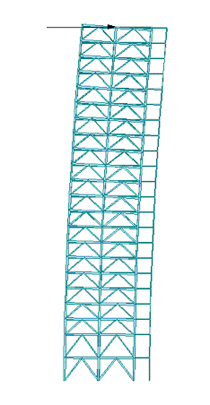
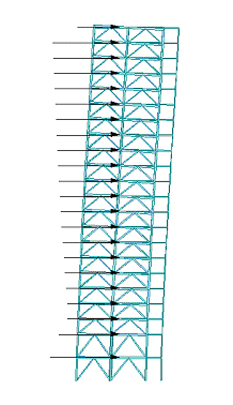
the unit load method to a building subject to a wind load as shown in
Fig. 2b, we apply a unit load at the top of the building as Fig. 2a to
find the maximum lateral displacement. If we consider the maximum displacement
due to the wind as a virtual displacement is the sum of
displacements contributed by the individual elements.
where,
m : Number of elements
is
said to be the displacement participation of each element, which is expressed
as
Displacement participation
in a lateral resisting system can be quantified and as such it can be
optimized.
(a)
(b)
Fig.
2 Unit
load application for lateral displacement calculation
Components
Select a component for displacement participation
by elements and section properties.
Total:
Sum of displacement participation for all the components
Axial:
Displacement participation for axial component in the x-axis direction
of the Element Coordinate System
Torsional:
Displacement participation for torsional moment component about the x-axis
of the Element Coordinate System
Moment-y:
Displacement participation for bending moment component about the y-axis
of the Element Coordinate System
Moment-z:
Displacement participation for bending moment component about the z-axis
of the Element Coordinate System
Shear-y:
Displacement participation for shear force component in the y-axis of
the Element Coordinate System
Shear-z:
Displacement participation for shear force component in the z-axis of
the Element Coordinate System
Type
of Display
Define the type of display as follows:
Contour
Display the
displacement participation of the model in contour.
Ranges:
Define the contour ranges.
: Assign the color distribution
range of contour. Using the function, specific colors for specific ranges
can be assigned.
Note
Contour Range Max/Min values can be larger than the max/min output values.
If the
Contour Range values exceed the output values, they are entered at Rank
0 and Rank 11.
Number of
Colors: Assign the number of colors to be included in the contour
(select among 6, 12, 18, 24 colors)
Colors:
Assign or control the colors of the displacement contour.
Color Table:
Assign the type of Colors.
: Control the colors by zones
in the contour.
Reverse
Contour: Check on to reverse the sequence of color variation in
the contour.
Contour
Line: Assign the boundary line color of the contour
Element
Edge: Assign the color of element edges while displaying the contour
Contour
Options: Specify options for contour representation
Contour Fill
Gradient
Fill: Display color gradient (shading) in the contour.
Draw Contour Lines: Display color boundaries in the contour.
Draw Contour
Line Only
Display only the colored boundaries of the contour.
Mono line:
Display the boundaries of the contour in a mono color.
Contour
Annotation
Legend or annotation signifying the ranges of the contour is displayed.
Spacing:
Display the spacing for the legnd or annotation.
Coarse Contour(faster) (for large plate or solid
model)
Represent a simplified contour for a large model using plate or solid elements
in order to reduce the time required to represent a complete contour.
Extrude
Where plate elements or solid elements along a cutting plane are represented
in contour, a three dimensional contour is created. The positive direction
of the analysis results is oriented in the z-axis direction of the local
element coordinate system.
The option is not concurrently applicable with the Deformed Shape option.
Similarly, the option cannot be concurrently applied to the cases where
the Hidden option is used to display plate element thicknesses or the
Both option is used to represent Top & Bottom member forces (stresses).
Values
Display the
nodal displacements in numerical values.
The font and color of the numbers can be controlled in Display Option.
Decimal
Points: Assign decimal points for the displayed numbers
Exp.: Express as exponentials
Min
& Max: Display the maximum and minimum values
Abs Max: Display the absolute maximum value
Max: Display only the maximum value
Min: Display only the minimum value
Limit Scale(%): Set the screen display limit for nodal displacements
relative to the selected maximum or minimum value
Set
Orientation: Display orientation of numerical values
Note
The default Decimal Points can be controlled in "Preferences".
Set Orientation = 0 horizontally displays the numerical values to the right
of nodes or elements.
The orientation angle represents the counter-clockwise direction, which
may be used to enhance the readability of the numbers.
Legend
Display various
references related to analysis results to the right or left of the working
window.
Element numbers pertaining to the maximum
and minimum forces are displayed.
Legend
Position: Position of the legend in the display window
Rank
Value Type: Values for Legend (Exponential or fixed values)
Type
of Display
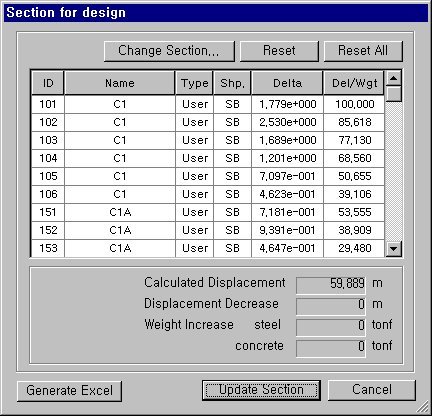
Click
the Displ. Participation Factor button to prompt a dialog box, which shows
the prediction of lateral displacement and the change of weights based
on changing sections.
Section for Design dialog box
:
Used to change sections selected in the list
: Used to revert sections
selected in the list to the sections of the original model
: Used to revert all the changed
sections to the sections of the original model
Calculated
Displacement: Lateral displacement
Displacement
Decrease: Change (reduction) of displacement
Weight
Increase steel: Increase in weight
of structural steel
concrete:
Increase in weight of concrete
: Incorporate the changed sections into the model.
 Displacement Load Case
 to the right to add new or modify/delete previously
defined load cases. (Refer to Load
Cases.)
to the right to add new or modify/delete previously
defined load cases. (Refer to Load
Cases.)
 : Displacement
participation by each element
: Displacement
participation by each element  :
Each displacement component of each element
:
Each displacement component of each element  : Weight
of each element
: Weight
of each element 
 : Displacement
participation by each section property
: Displacement
participation by each section property 
 ) in Fig. 1b is expressed as
 , flexural deformation
  , shear deformation
 and
torsional deformation
and
torsional deformation  . And the internal force in the simple
beam due to the unit load is consisted of
. And the internal force in the simple
beam due to the unit load is consisted of  . The internal
virtual work done by the unit load to cause the deformation Δ becomes
. The internal
virtual work done by the unit load to cause the deformation Δ becomes

 , the deformation of the beam element becomes
 ), to derive
the equation of the unit-load method.
), to derive
the equation of the unit-load method. 
 : shape factor for shear
  is the sum of
displacements contributed by the individual elements.
is the sum of
displacements contributed by the individual elements. 
 is
said to be the displacement participation of each element, which is expressed
as
is
said to be the displacement participation of each element, which is expressed
as 

.jpg) : Assign the color distribution
range of contour. Using the function, specific colors for specific ranges
can be assigned.
: Assign the color distribution
range of contour. Using the function, specific colors for specific ranges
can be assigned..jpg) : Control the colors by zones
in the contour.
: Control the colors by zones
in the contour..jpg)

 : Used to revert sections
selected in the list to the sections of the original model
: Used to revert sections
selected in the list to the sections of the original model : Used to revert all the changed
sections to the sections of the original model
: Used to revert all the changed
sections to the sections of the original model : Incorporate the changed sections into the model.