Function
Display inertia forces and accelerations from response spectrum analysis at each node of a structure.
Note
This function is activated when masses are entered as “Lumped Mass Type? which will be used for Eigenvalue analysis.
Call
From the Main Menu select Results >Nodal Results of RS.
Select Results > Nodal Results of RS in the Menu tab of the Tree Menu.
Usage
|
|
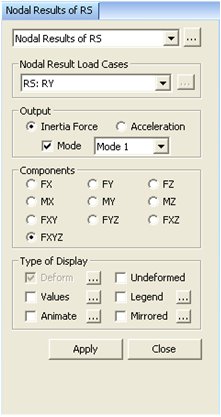
Load Cases/CombinationsSelect a desired RS load case. OutputInertia Force: Inertia force at a node Acceleration: Acceleration at a node Mode: Inertial force and acceleration at a node for the selected Mode Note When this option is checked off, inertia force and acceleration calculated using the selected method from Modal Combination Control of Response Spectrum Load Case is displayed.
ComponentsWhen Inertia Force is selected FX: Inertia force in GCS-X direction FY: Inertia force in GCS-Y direction FZ: Inertia force in GCS-Z direction MX: Bending moment about GCS-X axis MY: Bending moment about GCS-Y axis MZ: Bending moment about GCS-Z axis FXY: Combined inertia force about GCS-XY direction FYZ: Combined inertia force about GCS-YZ direction FXZ: Combined inertia force about GCS-XZ direction FXYZ: Combined inertia force about GCS-XYZ direction When Acceleration is selected DX: Acceleration in GCS-X direction DY: Acceleration in GCS-Y direction DZ: Acceleration in GCS-Z direction RX: Rotational acceleration about GCS-X axis RY: Rotational acceleration about GCS-Y axis RZ: Rotational acceleration about GCS-Z axis DXY: Combined acceleration about GCS-XY direction DYZ: Combined acceleration about GCS-YZ direction DXZ: Combined acceleration about GCS-XZ direction DXYZ: Combined acceleration about GCS-XYZ direction
|
Type of Display
Define the type of display as follows:
|
Deform |
Display the deformed shape of the model.
|
|
Deformation Scale Factor Magnify or reduce the size of the displacement graphically displayed in the model window.
Beam Deformation Select the type of displacement display.
Nodal Deform: Display the deformed shape representing only the nodal displacements. Real Deform: Display the detail deformed shape including the calculated displacements along the sections between the end nodes in addition to the nodal displacements for beam elements.
Real Displacement (Auto-Scale off) The true deformation of the structure is graphically represented without magnifying or reducing it. This option is typically used for geometric nonlinear analysis reflecting large displacement.
Relative Displacement The deformation of the structure is graphically represented relative to the minimum nodal displacement, which is set to ?? |
|
Undeformed |
Overlap the undeformed and deformed shapes of the model. |
|
Values |
Display the inertia forces
and accelerations in numerical values.
|
|
Decimal Points:
Assign decimal points for the displayed numbers Min &
Max: Display the maximum and minimum values Set Orientation: Display orientation of numerical values Note |
|
Legend |
Display various references related to analysis results to the right or left of the working window. Element numbers pertaining to the maximum and minimum forces are displayed. |
|
Legend Position: Position of the legend in the display window Rank Value Type: Specify a type of values in the Legend and the number of decimal points. |
|
Animate |
Dynamically simulate the transition process.
|
|
Animation Mode: Select the type of animation for analysis results. Animate
Contour: Option to change the color of the contour representing
the transition according to the magnitudes of variation Note AVI Options: Enter the options required to produce the animation window. Bits
per Pixel: Number of bits per pixel to create the default window
for animation Construction Stage Option: Select the animation options when the construction stage analysis is performed. Stage Animation: Animations by construction stages Current Stage-Step: Animations by Steps in the current construction stage From ~ To: Starting and ending construction stages or steps for animations
| |
|
Mirrored
|
"Mirrored" allows the user to expand the analysis results obtained from a half or quarter model into the results for the full model by reflecting planes. |
|
Half Model Mirroring Quarter Model Mirroring Mirror by: Specify the mirror plane (s) by designating a plane and a coordinate in the direction perpendicular to the plane in GCS. |