 New for Ver.7.4.1 New for Ver.7.4.1
Function
Add, modify or delete the increment control function to apply to the Stepping Control Option in the Pushover Load Cases.
Call
From the Main Menu select Design > Pushover Analysis > Pushover Increment Function.
Entry
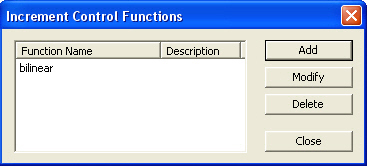
■ Enter new or additional increment control function
Click  .
.
■ Modify previously entered increment control function
Select the relevant increment
control function from the increment control function list of the dialog
box and click .
.
■ Deleting previously entered increment control function
Select the relevant increment
control function from the increment control function list of the dialog
box and click  .
.
Click or to display the dialog box below and
enter the required data in the relevant entry fields.

 Import CSV File...
Enter the Increment Control Function by reading previously created files. The data are saved as '.csv' extension.
User Input
The user directly enters the Increment Control Function.
Note
Although the value of 'Increment Steps (nstep)' entered in the Pushover Load Cases dialog is changed, the user does not need to change the Increment Control Function since it is automatically applied according to specified Increment Steps (nstep).
For example, if the user enters the Increment Control Function as the table below and Increment Step (nstep) is specified as 10,
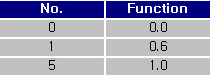 or
or 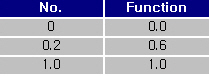
applied the Increment Control Function is as the table below.
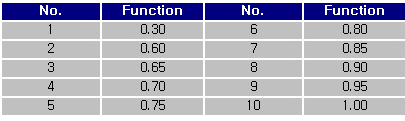
• Example for Pushover Increment Function
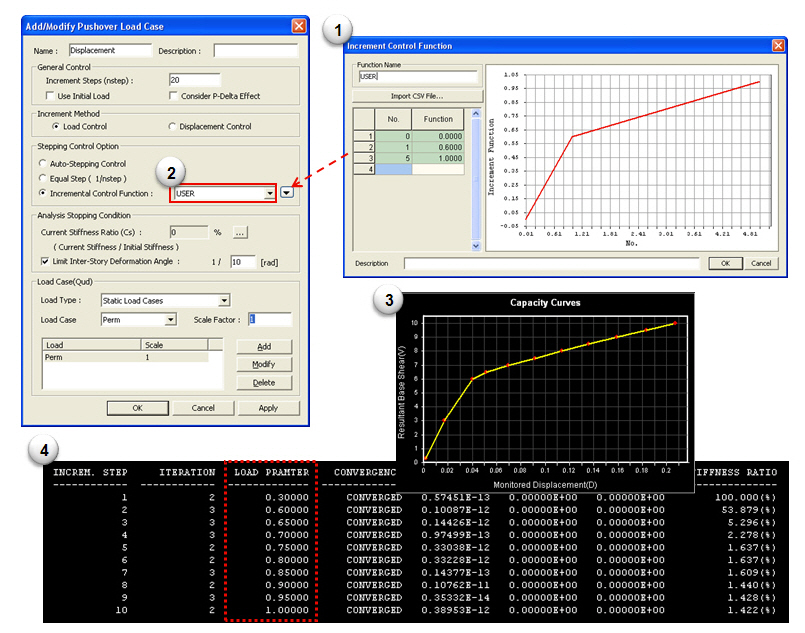
① Generate the Increment Control Function.
② Define the generated function in the Pushover Load Case dialog.
③ After performing analysis, pushover curve will be produced identical to the pattern of Load-Displacement curve.
④ Check text file which contains analysis results of the load parameter and Increment Function.