 New for Ver.7.4.1 New for Ver.7.4.1
Function
Produce text files for pushover analysis results. Maximum/minimum values may be selectively produced.
Call
From the Main Menu select Design > Pushover Analysis > Pushover Text.
Entry
|
|
Step: Total pushover analysis results with maximum/minimum values Maximum & Minimum: Maximum/minimum values only
Specify the step range and interval for the pushover analysis results which are to be produced. Select an entity for which the pushover analysis results which will be produced. User Input: Enter the node numbers. Selected Nodes in View: Use the selected nodes in the model window. Select a reference point for displacement when Node Result is selected. Ground: Select the ground as the reference point. Another Node: Select another node as the reference point. Select a pushover load case for the pushover analysis results which are to be produced.
|
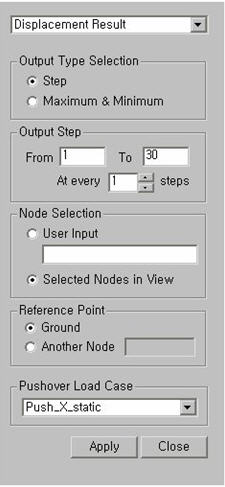
 Output Type Selection