Beam Detail Analysis
Produce a detail deformed shape, SFD/BMD, maximum stress distribution and sectional stress distribution diagrams for a particular section.
From the Main Menu select Results > Detail > Beam Detail Analysis.
 Load Cases/Combinations
Select a desired load case or load combination.
Click  to the right to enter new or modify existing load combinations.
(Refer to "Load Cases / Combinations")
to the right to enter new or modify existing load combinations.
(Refer to "Load Cases / Combinations")
 Element Number
Enter the element number for which a detail analysis is desired,
or click the element number entry field and the relevant beam
element in the working window.
Note
Beam Detail Analysis finds forces for moving load cases, load combinations
including moving loads and envelope load cases by interpolating
the values at i, 1/4 points, midpoint and j node.
DISP/SFD/BMD z-dir.
Results Window
Produce deformed shape, SFD and BMD for the beam element's strong axis
Displacement:
Dz
Deflected shape in the element's local z-direction and the corresponding
numerical values
Di (abs) : Absolute displacement at node i (N1)
Dj (abs) : Absolute displacement at node j (N2)
Di (rel) : Relative displacement at node i (N1)
Dj (rel) : Relative displacement at node j (N2)
Note
The relative displacement is obtained by setting the smaller displacement
of nodes i or j to 0 (zero) and calculating the relative displacement
of the other node.
Dmax (abs) : Maximum absolute displacement and the position
Dmax (rel) : Maximum relative displacement
Dmin (abs) : Minimum absolute displacement and the position
Dmin (rel) : Minimum relative displacement
Duser (abs) : Absolute displacement and the position at the location assigned by the user
Duser (rel) : Relative displacement and the position at the location assigned by the user
Note
Move the mouse cursor to the left or right in the displacement
graph or use the slide button at the
bottom of the results window to assign the position
of interest.
Shear
Force Diagram: Fz
Shear force in the element's local z-direction and the corresponding
numerical values
Fi: Shear force at node i
Fj: Shear force at node j
Fmax: Maximum shear force and the position
Fmin: Minimum shear force and the position
Fuser: Shear force and the position at the location assigned by the user
Bending
Moment Diagram: My
Bending moment about the element's local y-axis and the corresponding
values
Mi: Bending moment at node i
Mj: Bending moment at node j
Mmax: Maximum bending moment and the position
Mmin: Minimum bending moment and the position
Muser: Bending moment and the position at the location assigned by the user
DISP/SFD/BMD y-dir.
Results Window (Refer to DISP/SFD/BMD z-dir. Results Window)
Produce the deformed shape, SFD and BMD for the beam element's weak axis
Displacement:
Dy
Deflected shape in the element's local y-direction and the corresponding
numerical values
Shear
Force Diagram: Fy
Shear force in the element's local y-direction and the corresponding
numerical values
Bending
Moment Diagram: Mz
Bending moment about the element's local z-axis and the corresponding
numerical values
Section Results Window
Entry
Section
Stress
Select a stress component and the corresponding member force components
in the dialog bar of Beam Detail Analysis and click  .
.
Stress components
Normal
Stress in the element's local x-direction (  )
)
Axial stress + Bending stresses due to My and Mz
Tau-xy:
Shear stress in the element's local y-direction (  )
)
Tau-xz:
Shear stress in the element's local z-direction ( )
von-Mises
von-Mises
Stress = 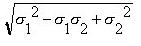
where,
 :
Maximum principal stress
:
Maximum principal stress
 :
Minimum principal stress
:
Minimum principal stress
Tresca
Tresca
Stress = 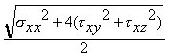
Member Force Components
Fx: Axial force in the element's x-direction
Fy: Shear force in the element's y-direction
Fz: Shear force in the element's z-direction
Mx: Torsional moment about the element's x-axis
My: Bending moment about the element's y-axis
Mz: Bending moment about the element's z-axis
Output
Longitudinal
Maximum Stress
Provide the maximum and minimum distribution diagram and the corresponding
numerical values for the assigned stress
component along the length of a beam.
Sig-i:
Maximum section stress at node i (N1) (  )
)
Sig-j:
Maximum section stress at node j (N2) ()
Sig-max:
Maximum stress and the position ( )
)
Sig-min:
Minimum stress and the position ( )
)
Sig-user:
Maximum stress at the location assigned by the user ( )
)
Note
Move the mouse cursor to the left or right in the maximum stress graph
to
assign the
position of the stress to be checked.
Cross
Section Stress
Display the stress distribution and the corresponding values for
a particular section of the beam element.
Sig-max:
Maximum stress and the position in the section ()
Sig-min:
Minimum stress and the position in the section ()
Sig-user:
Stress at the position assigned by the user ()
Assign the desired position (on the element's local y-z plane) in the section stress distribution diagram by moving the mouse cursor to the left or right and up or down. In addition, assign the desired position along the length (in the element's local x-axis) by moving the mouse cursor to the left or right in the maximum stress graph.
Location
abs: Distance from the i node to the position assigned by the user
rel (X/L): Distance ratio relative to the total length for the position assigned by the user
Applied Forces/Moments [Fx, Fy, Fz, Mx, My, Mz]: Member forces at the position along the length assigned by the user
Note
When stress checks are required for a tapered section, its section information such as DB/User and PSC(DB) types is required to produce stresses at the positions (1/4, 1/2 & 3/4). In contours, diagrams and tables, section properties at the positions (1/4, 1/2 & 3/4) are obtained by interpolation between i-end and j-end. Whereas in Beam Detail Analysis, the section properties at the positions (1/4, 1/2 & 3/4) are re-calculated using the section shape information at the corresponding positions. If section properties are not defined in a section, stress results will not be generated.