Select
Node(s)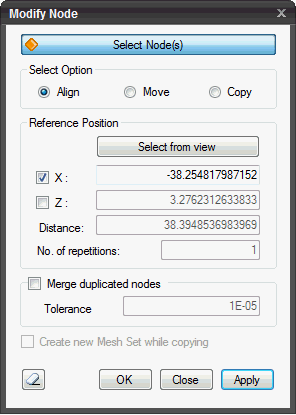
Select
node(s) to be transformed.
Select
Option
Align
Align the selected nodes with respect to
either X-/Z- reference coordinate.
Move
Move the selected nodes parallel to a vector
drawn from Pick Point 1 to Pick Point 2.
Copy
Copy the selected nodes
parallel to a vector drawn from Pick Point 1 to Pick Point 2.
Reference
Position
To align the selected nodes with respect
to either X-/Z- reference coordinate, a value for chosen axis need to
be provided.
Input
location in view
To pick a reference node from the nodes displayed
in the Works Window and using either its X/Z coordinate as a reference
for alignment.
Pick
Point
Choose
a reference node.
X
By
default, the X coordinate is checked on  for alignment. If 'Input location in view'
is chosen, the X coordinate of the reference node is updated automatically.
Additionally, a value on X-axis can be manually entered. for alignment. If 'Input location in view'
is chosen, the X coordinate of the reference node is updated automatically.
Additionally, a value on X-axis can be manually entered.
Z
Check on
Z to align nodes along the Z-axis. If 'Input location in view' is chosen,
the Z coordinate of the reference node is updated automatically. Additionally,
a value on Z-axis can be manually entered.
Translation
Input location in view
To pick a reference node from the nodes displayed
in the Works Window and using either its X/Z coordinate as a reference
for alignment.
Pick
Point 1
Choose
first reference node.
Pick
Point 2
Choose second reference node.
Distance
The distance represents
the magnitude of vector drawn from Pick Point 1 to Pick Point 2.
No.
of repetitions
Enter the number of
times Move/Copy has to be repeated.
Merge
duplicated nodes
Check on
to merge the duplicated nodes which fall within the specified Tolerance
value.
Tolerance
Enter the Tolerance
value below which adjacent nodes will be merged.
Create
new Mesh Set while copying
Create new Mesh
Set when nodes are copied. The attribute of new Mesh Sets is the same
as that of original Mesh Set.
Click  to reset the menu.
Click  to move the node. The window will close automatically.
Click  to close the window or press the ESC key to close
the dialog box.
to close the window or press the ESC key to close
the dialog box.
Click  to move the node. After the nodes are moved, the work process will switch
to Select Nodes.
to move the node. After the nodes are moved, the work process will switch
to Select Nodes.
| 


