Merge Nodes | ||||||
|
| ||||||
|
| ||||||
|
Merge nodes to a single node. Applicable Modules:
| ||||||
|
| ||||||
|
| ||||||
|
| ||||||
|
From the Main Menu,
select Model
> Node > Merge Nodes From the Command Line, type 'MergeNode' or 'MN' | ||||||
|
| ||||||
|
| ||||||
|
Select
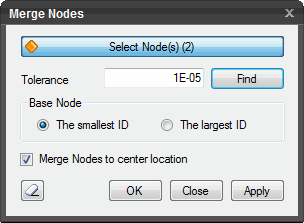
Nodes Select the nodes to be merged.
Tolerance Search all nodes within the tolerance from the selected nodes.
Base Node Define the base node into which other nodes will merge. The largest ID Largest node number The smallest ID Smallest node number
Merge Nodes to a center location Check on this option to merge the selected nodes to the mid-point of the nodes. If checked off, merging will take place towards the base node.
Click Click Click Click
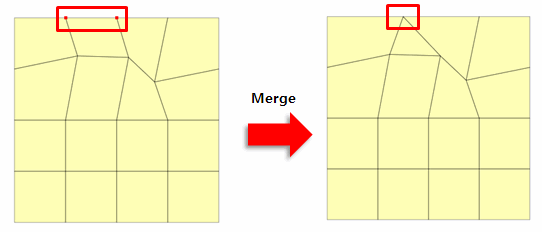
Note: Selected two nodes are merged into a node located at the shortest distance between the two nodes. The two nodes are merged in referenced to the smaller node ID number. That is, the smaller node ID number is maintained.
When three or more nodes are selected, all the nodes within the tolerance are merged. When two nodes are selected, the tolerance between the two nodes can be automatically calculated. The user must specify a tolerance if three or more nodes are selected because the tolerance cannot be calculated or, if two nodes are selected first, the tolerance is automatically calculated and if subsequent nodes are sequentially selected, the tolerance is calculated in reference to the distance between the first two nodes, in order to merge three or more nodes.
| ||||||
|
|


 to initialize the dialog box.
 to merge the node. The window will close automatically.
 to close the window or press the ESC key to close the dialog box.
 to merge the node. After the nodes are merged, the work process will switch
to Select Nodes.
to merge the node. After the nodes are merged, the work process will switch
to Select Nodes.