Renumber the node/element
numbers in the order of priority set by the user.
Applicable Modules:
Tunnel
Slope
Soft
Ground
Foundation
Seepage
Dynamic
From the Main Menu,
select Model
> Node > Renumber
From the Command
Line, type 'NodeRenumbering'or
'NR'
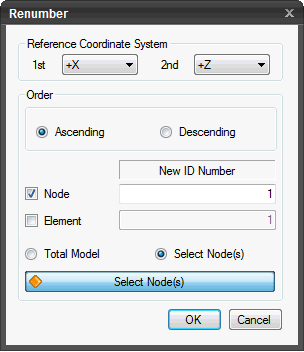
Reference Coordinate
System
Set the direction of
priority upon which the renumbering process will be based.
1st
Select the first priority
reference, +X, -X, +Z or -Z.
2nd
Select the second priority
reference. Depending on the first reference, (+X or -X) or (+Z or -Z)
can be selected.
Order
Ascending
Renumbering will take
place by increasing numbers.
Descending
Renumbering will take
place by decreasing numbers.
Node
Check on to renumber
node numbers. Check off to skip node renumbering.
Element
Check on to renumber
element numbers. Check off to skip element renumbering.
Total
Model
Renumber the node numbers
and/or element numbers of the total model.
Select
Node(s)/Element(s)
Renumber the node numbers
and/or element numbers of the selected elements only.
Click
to execute the renumbering operation. The dialog box will close automatically.
Click
to close the dialog box or press the ESC key.
Note:
The
following diagrams illustrate the renumbering process. The left diagram
shows the default numbering for nodes assigned counterclockwise during
mesh generation. The right diagram illustrates renumbering the default
node numbers in the ascending order in the +X direction (first priority)
and +Z direction (second priority), starting from 1.
Ascending
It
is common to use 1 as the start number when renumbering node / element
numbers for the total mesh. When renumbering node
/ element numbers by selecting specific elements, the start number must
be the one that has not been assigned to any element of the unselected
elements.


 to execute the renumbering operation. The dialog box will close automatically.
 to close the dialog box or press the ESC key.
