Structural Property | ||||||||
|
| ||||||||
|
| ||||||||
|
Define the Structural Properties for an Analysis Model. For line type of structural elements both section data and material properties need to be specified. Applicable Modules:
| ||||||||
|
| ||||||||
|
| ||||||||
|
| ||||||||
|
From the Main
Menu, select Foundation
> Property > Structural Property From the Command Line, type 'StructuralProperty' or 'SP' From the Works Tree, invoke context menu through, Property > Structural Property | ||||||||
|
| ||||||||
|
| ||||||||
|
| ||||||||


|
Element Types |
|||
Standard
Specify a standard for nominal sizes.
Section
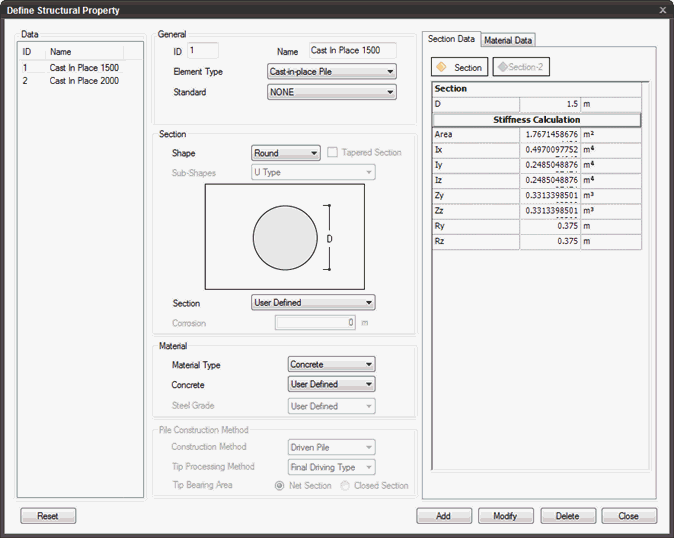
Define the section of the structural material selected in Member Type. The section properties can be modified under the Section Data tab on the right.
Shape
The section shapes are:
Round / Rectangle / Pipe / H / User Defined.
Section
Define the section size of the structural material.
Section Data
Define the section dimensions based on the selected Member Type and Section Shape. Refer to the diagram for dimensions from which the stiffness is automatically calculated. Some stiffness values need to be directly defined by the user.
Material
Select the material and grade for the selected Member Type and Section Shape. Detail material properties are modified under the Material Data tab.
Material Type
Modify the material properties of the selected structural material (concrete, steel, User Defined).
Material Data
Click  to reset the parameter values to the default values.
Click  to add the property.
Click  to modify an already defined property.
Click  to delete the property.
Click  to close the window.