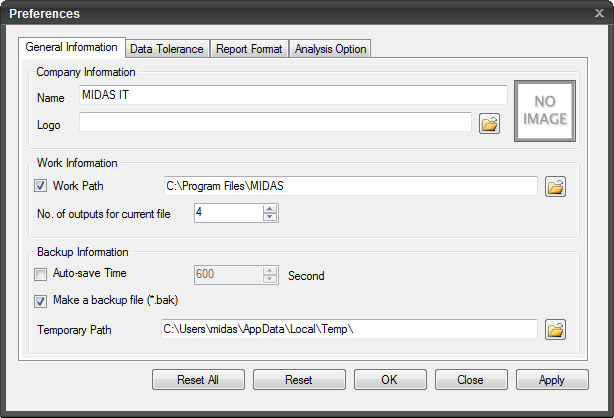
General Information
Company
Information
Set the company information.
Name
Name of the company,
branch office, etc.
Logo
Specify the file path
for the logo file to be used in the Post-processing.
Work
Information
Work
Path
Check on to specify
the work path. The default setting of SoilWorks will be used when checked
off.
No.
of outputs for current file
Specify the number of
files recently worked on to be displayed at the main icon.
Backup
Information
Auto-save
Time Interval
Set the time interval
for automatically saving work files.
Make
a backup file (*.bak)
Check on to create a
backup file when the file is saved.
Temporary
Path
Specify the path for
saving the backup file.
Data
Tolerance
General
Tolerance
Tolerance
considered as zero
Program considers any
number less than the specified value as 0.
Data
Tolerance
Duplicate
Tolerance
Specify the tolerance
value within which two points will be considered to be overlapped and
will be merged.
Intersecting
Tolerance
Specify the tolerance
within which two elements will be considered to be intersected and will
be connected.
Report
Format
Image
Caption Font
Click the button to
set the font, size, color and effect of the graphics caption.
Text
Font
Click the button to
set the font, size, color and effect of the characters.
Table
Style and Font
Click the button to
set the font for the title and contents in the cells, font size, color
and effect of the table.
Output
Unit System
Set the unit system
to be used for generating the report.
Analysis
Option
Automatically
Consider Water Pressure
Select whether or not
to automatically consider water pressure and set the direction of the
water pressure.
Inner
Direction of Model
Set the water pressure
to exert toward the inner direction of the model.
Outer
Direction of Model
Set the water pressure
to exert toward the outer direction of the model.
Not
Considered
Do not apply water pressure
automatically.
Print
Ground Element Forces
Check on to produce
the output of the ground elements’ internal forces.
 Initialize all the preference settings to
the defaults. Initialize all the preference settings to
the defaults.
 Initialize the preference settings of the
presently selected tab to the defaults. Initialize the preference settings of the
presently selected tab to the defaults.
 Click to update the preference settings defined
and close the dialog box. Click to update the preference settings defined
and close the dialog box.
 Click the ESC key to close the dialog box. Click the ESC key to close the dialog box.
 Click to update the preference settings defined. Click to update the preference settings defined.
| 


