Polygonal Failure Surface
Create Polygonal Failure Surfaces in Slope Stability Analysis (SAM, LEM).
Applicable Modules:
Ground |
Slope |
Soft Ground |
Foundation |
Seepage |
Dynamic |


From
the Main
Menu, select Limit
Equilibrium Method > Boundaries > Polygonal Failure Surface

From the Command Line, type 'PolygonalSurface'
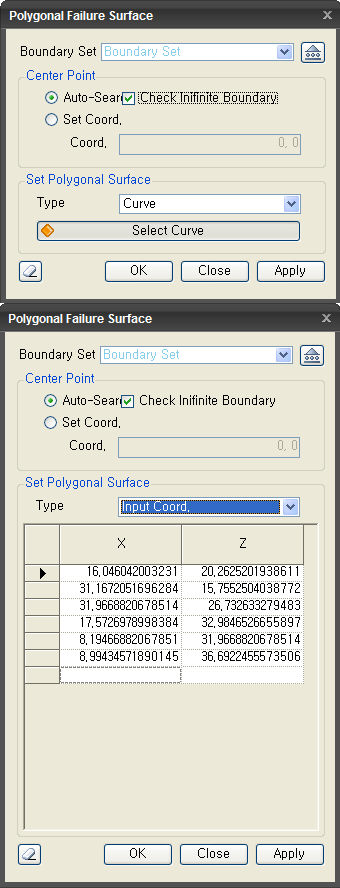
Boundary Set
Select the Boundary
Set under which the Polygonal Failure Surface has to be assigned
. Click  to invoke
the Define Boundary Set dialog to Add, Modify or Delete Boundary
Set(s).
to invoke
the Define Boundary Set dialog to Add, Modify or Delete Boundary
Set(s).
Center Point
Auto-Search
Find the center of the circle close to the user-defined polygonal failure surface using the least squared method and calculates the safety factor about the point.
Check Infinite Boundary
Polygonal failure surface is assumed to be a circle of which radius is infinite and it calculates the safety factor in the same manner for calculating the safety factor of the arc failure surface
Set Coord.
Calculate the safety factor relative to an arbitrary reference point that user defined.
Set Polygonal Surface
Curve
Select the curves as polygonal surface directly.
Input Coord.
Mouse-click on the model view to create a Polygonal Failure Surface which registers the X, Z coordinates. The coordinates in the table can be Added, Modified or Deleted which will be reflected in the model.
 After creating the boundary condition, the dialog box will close
upon clicking.
After creating the boundary condition, the dialog box will close
upon clicking.
 Click the ESC key to close the dialog box.
 After creating the boundary condition, the work process will switch
to the state of new name entry upon clicking.
After creating the boundary condition, the work process will switch
to the state of new name entry upon clicking.
Note: Right-click to end defining the surface at the last point or click on Apply. This will register the boundary condition and the dialog is then ready for a new name entry.
A Polygonal Failure Surface is generally used when a known weak ground layer is present in the slope, which is considered to be a dominant failure surface as opposed to Arc Failure Surface.
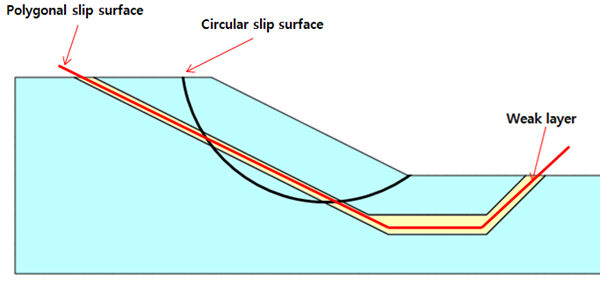

< The Center of the Circle of the Multi-Linear Failure Surface >