Limit Equilibrium Method
Specify the detail items of the LEM (Limit Equilibrium Method) Analysis results.
Applicable Modules:
Ground |
Slope |
Soft Ground |
Foundation |
Seepage |
Dynamic |


From the Property Window, select Limit Equilibrium Method
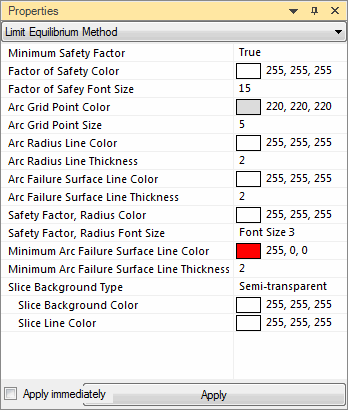 Minimum Safety Factor
Produce the minimum factor of safety on the grid.
Factor of Safety Color
Specify the color of the minimum safety factor to be represented in the grid.
Factor of Safety Font Size
Specify the font size of the minimum safety factor to be represented in the grid.
Arc Grid Point Color
Color of the grid points.
Arc Grid Point Size
Size of the grid points.
Arc Radius Line Color
Color representing the line of the arc radius.
Arc Radius Line Thickness
Thickness of the line of the arc radius.
Arc Failure Surface Line Color
Color of the line representing the arc failure surface.
Arc Failure Surface Line Thickness
Thickness of the line representing the arc failure surface.
Safety Factor, Radius Color
Specify the color of the safety factor and radius produced in the result data when arc failure surface is selected.
Safety Factor, Radius Font Size
Specify the font size of the safety factor and radius produced in the result data when arc failure surface is selected.
Slice Background Type
Specify the slice background color, transparent, semi-transparent or opaque.
Slice Background Color
Slice Line Color
Apply Immediately
The changed items in the detail items are immediately applied to the result data.
Apply
The changed items in the detail items are applied to the result data.