Story Drift Table (Time History Analysis)
Check story drift resulting from the time history analysis in a spreadsheet format table.
Before using this function, "Story Response of Time History Results" must be checked in the Model > Building > Control Data.
Table Tool in midas Gen offers a variety of powerful built-in functions. Refer to the following items for detail directions:
Usage of Table Tool
Terminology
Familiarize with Usage
Basic directions (Cell motion, selection, size control, etc.)
Data manipulation (Add, delete, modify data, etc.)
Copy/Paste data using clipboard
Supplementary Table functions
Table Sorting
Table format setting
Auto-fit column width
Graph printing
Supplementary functions by Table types
Node/Element Table
Results Table
From the Main Menu select Results > Result Tables > Story > Story Drift (Time History Analysis)
Select Result Tables > Story > Story Drift (Time History Analysis) in the Tables tab of the Tree Menu.
From Records Activation Dialog, select the time history load cases for which story drifts will be calculated.
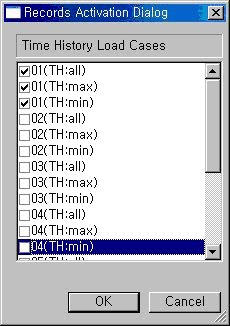
Record Activation dialog box
Refer to Usage of Table Tool and check the following data:
Drift(X): Story drift in GCS X-direction
Drift(Y): Story drift in GCS Y-direction
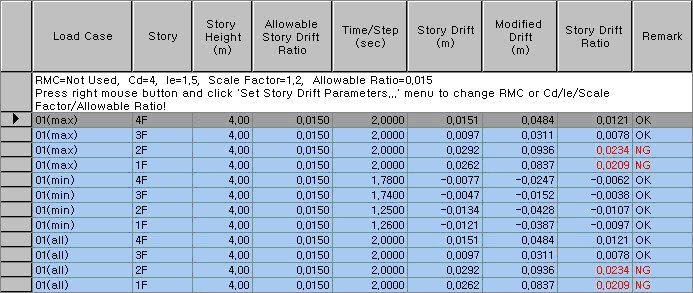
Load Case: Time history load case/combination
Note
Time history load cases always retain "max" "min"and "all" load cases, which produce maximum, minimum and absolute maximum values for all time steps respectively. If Consider signs in load combination type of envelope "All" option is checked in Tools > Preference > Results, the values are produced with signs instead of the absolute maximum values (The option is unchecked by default).
Story: Story ID
Story Height: Story Height
Allowable Story Drift Ratio: Allowable Story Drift Ratio (User input)
Time/Step
Story Drift
Modified Drift: Modified story drift
Story Drift Ratio: Modified Drift / Story height
Remark: Acceptance of story drift ratio relative to the allowable story drift ratio
Note
For the rows in which the values at Story Drift Ratio column do not fall within the allowable limit, the Remark column (NG) turns red in color.