Reaction to Load
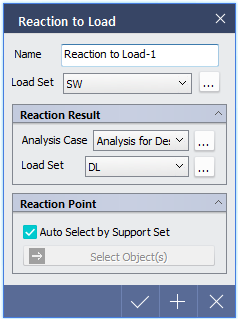
Convert reactions of selected analysis case as point load of specific Load Set.
▒ Call
[Load] Tab > [Specific] > [Reaction to Load]
Work Tree [Analysis] Tab > [Static Load] > Sub Item of selected Load Set defined in 'Reaction to Load' function > Right-Click > [Modify], [Delete] |

▒ Detail Description
< Reaction to Load Dialog > |
|
Reaction Result |
|
|
|
Reaction Point |
|
Calculate reactions and select points to apply point loads. If 'Auto Selected by Support Set' option is checked, Support Set included in analysis case is automatically selected. In order select specific points, the option should be unchecked and target point must be selected individually using 'Select Object(s)'. |
 to access Static load Set dialog.
|
