|
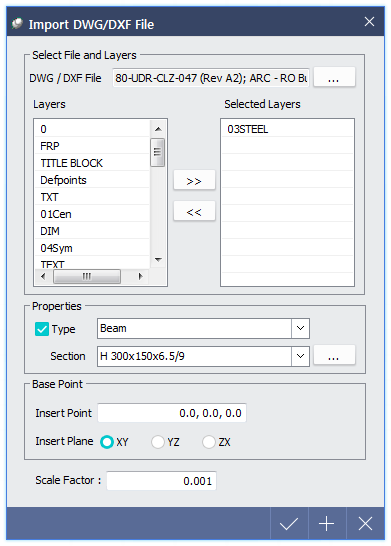
 Select File and Layers Select File and Layers
 DWG / DXF File : Select to import DWG / DXF file. DWG / DXF File : Select to import DWG / DXF file.
Layers : Check layers saved in the file.
Selected Layers : Select desirable layers to be compatible with midas nGen and click arrow button  . .
Properties
Type : Line(body) can be imported as member and the type can be selected. Beam, Column, Sub Beam, Sub Column and Brace can be selected. If this option is unchecked, line will be imported as body.
Section : Define section of line member. Saved section is compatible and new section can be created with  button if it is desired to be imported as new section. button if it is desired to be imported as new section.
Base Point
Insert Point : The origin (0, 0, 0) of DWG / DXF file will be imported on the specified coordinate of midas nGen.
Insert Plane : The XY plane of DWG / DXF file will be imported on selected plane of midas nGen.
Scale Factor : Define scale of imported DWG / DXF file. If unit system of midas nGen and DWG / DXF files are different, Scale Factor is applied when importing the file.
 Compatible objects : Line, Circle, Ellipse, Arc Compatible objects : Line, Circle, Ellipse, Arc
|