Story (Mode)
Enter 2D Plane Mode (Top View) of selected story.
▒ Call
|
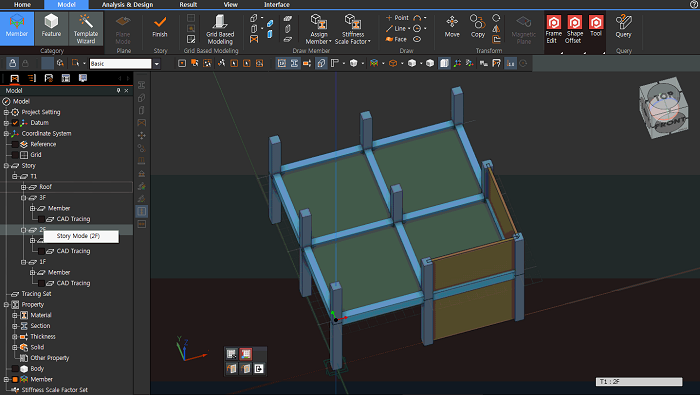
Work Tree [Model] > [Story] > [Story Set] > [List] > Right-Click > [Story Mode] |
▒ Detail Description
|
All the stories created from "[Structure] Tab > [Story] > [Story] > [Story Data]" can be accessed by using Story Mode. During Story Mode, all editing and drawing functions are only available for selected story level. For plane based drawing of vertical members, story height is recognized so that the vertical members are automatically created. "[Body] Tab > [Sketches(on Plane) > Arc, Circle, Ellipse" functions can be used. Story change methods in Story Mode are as follows. - Work Tree [Model] > [Story] > [List] > Right-Click > [Story Mode] select - Click Story Name Box and select specific Story
|
|
|
