Point Mass

Enter lumped mass at both ends of line member(1D).


ΆΖ Call

New

[BC & Mass] Tab > [Mass] > [Point Mass]

Work Tree [Analysis] Tab > [Mass] > Right-Click > [Add Mass]

Modify, Delete

Work Tree [Analysis] Tab > [Mass] > [Mass Set] > [Mass] > [List] > Right-Click > [Modify], [Delete]


ΆΖ Detail Description

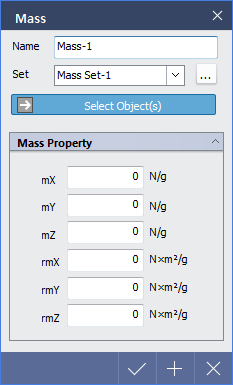
< Mass Dialog >

Name : Enter the name of mass.

Set : Select a mass set. Click to access Mass Set dialog.

Select Object(s) : Select object to assign mass.

Selectable Object(s) : Both end points of line member

Mass Property

Enter the values of lumped mass.

mX : Translated Lumped Mass in GCS X-direction.

mY : Translated Lumped Mass in GCS Y-direction.

mZ : Translated Lumped Mass in GCS Z-direction.

rmX : Rotational Mass Moment of Inertia about GCS X-axis.

rmY : Rotational Mass Moment of Inertia about GCS Y-axis.

rmZ : Rotational Mass Moment of Inertia about GCS Z-axis.