Crane Load Group
Define representative and reference points of reaction results which will be used for auto-generation of static load of moving load analysis results
▒ Call
|
[Load] Tab > [Gravity] > [Crane Load] > [Crane Load Group]
Work Tree [Analysis] Tab > [Moving Load] > [Crane Load Group] > Right-Click > [Modify], [Delete] |

▒ Detail Description
|
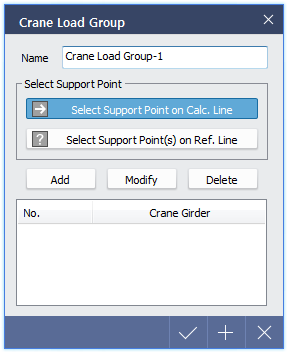
< Crane Load Group Dialog > |
After moving load analysis, different reaction force values at the support points of crane girder will be replaced with static loads. However running moving load analysis after setting crane load group, will apply static load value on reference point using moving load result from representative line. This function is useful when design is to be performed for all members using the most extreme moving load analysis results.
New group can be added and representative and reference values will be labeled as red and blue dash line respectively.
< Crane Load Group Generation > |

|
|
