PDMS Compare Model
Compare PDMS neutral file with midas nGen file.
▒ Call
|
[Interface] Tab > [3D CAD Program] > [PDMS] > [Compare with PDMS Model] |
▒ Detail Description
PDMS Compare Model is a function which can import modified(delete, edit, add) file of PDMS which was previously exported from midas nGen. It will then compare imported file with the current midas nGen file in order to add, delete or only consider modified members.
|
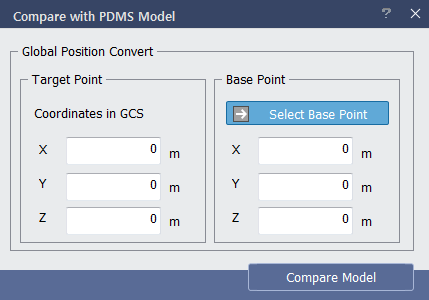
< PDMS Compare Dialog > |
Define the target point of PDMS file and base point of midas nGen for comparison.
Click 'Compare Model' to access the dialog to open PDMS Neutral File (*.mac) to compare with midas nGen. |
|
Compare Member |
|
|
① Click Compare at right bottom of Compare Mode(PDS) Management dialog. ② Mapping information can be checked in Section Mapping tab. ③ Deleted member from PDMS can be checked in Delete Member tab. ▶ If deleted member is selected from dialog, corresponding member is highlighted in 3D model view. ④ In order to view exact revision history of member deletion, click 'Model Revision Report' located at bottom left. ▶ Report is outputted in Excel file. ⑤ After final confirmation, click Apply ▶ Check message window |
|
|
|
|

|
|
