Project Nodes
Move or copy nodes by projection on a particular line or surface.
From the Main Menu select Node/Element > Nodes > Project.
Click
|
 Base Line Definition
Enter the data necessary to define a projection base as follows:
All the data can be directly typed in on the keyboard. Alternatively, click the relevant entry fields and the nodes (related data) defining the base in the working window.
Project nodes on a line
|
|
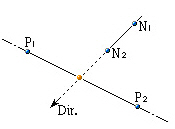
Project nodes on a plane
|
|
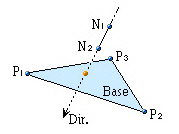
Project nodes on a cylinder
|
|
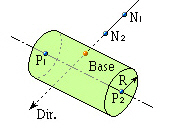
Project nodes on a cone
|
|
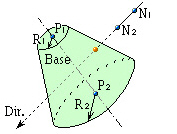
Project nodes on a sphere
|
|
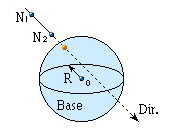
Project nodes on an ellipsoid
|
|
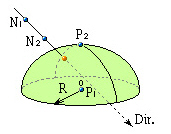
Project nodes on an ellipsoid
|
|
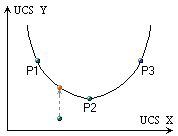
Project nodes on an element
|
|
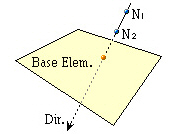
Direction
Assign the projection direction for the line or surface of the defined projection base.
Normal: Projection direction normal to the line or surface of the projection base
 Direction Vector: Projection
in an arbitrary direction. Enter each of the x, y, z vector components
in the projection direction.
Direction Vector: Projection
in an arbitrary direction. Enter each of the x, y, z vector components
in the projection direction.
Divide
Create additional elements in between the existing nodes and projected nodes along the lines of projection at either equal or unequal spacings.
Equal: Equal spacing
Number of Divisions: Number of equal spacings
Parametric Unequal: Unequal spacings defined in terms of distance ratios.
Ratio: Locations of division along the total projection length expressed in terms of distance ratios. (ex: 0.4, 0.6, 0.9)
Merge Duplicate Nodes
Merge overlapping nodes to single
nodes if new nodes coincide with existing nodes. Click  to modify
the Merging Tolerance.
to modify
the Merging Tolerance.
Copy Node Attributes
Select the option whether to copy
the attributes (nodal boundary conditions, nodal concentrated
loads, etc.) to the nodes being copied. Click
to assign desired attributes selectively.
Intersect Frame Elem
If line elements exist at the locations
to which nodes are project-copied or moved, divide the line elements
at the corresponding nodes. Click
to control the tolerance for the intersecting condition of a node
and a line element.