Auto-mesh Planar Area
Automatically generate a mesh by specifying an area.
From the Main Menu select Node/Element > Mesh > Auto-mesh Planar Area.
|
 Mesh Size
Define the size of the mesh elements. The size can be defined by a length or by the number of divisions.
Length : Define the side length of the mesh elements.
Division : Define the number of divisions for the reference elements comprising the area to be meshed.
Property
Element Type
Select the element type of the planar
mesh elements to be created. There are four element types available:
Plate, Plane Stress, Plane Strain and Axisymmetric. The  button to the right becomes active when the
element type is Plate or Plane Stress. Click the button to define
the Element Sub Type.
button to the right becomes active when the
element type is Plate or Plane Stress. Click the button to define
the Element Sub Type.
Material
: Enter the material property of the planar mesh elements to be
created. Click to the right to invoke the Material
dialog box.
Thickness
: Enter the thickness data of the planar mesh elements to be created.
Click
to the right to invoke the Thickness dialog box.
Domain
Name : Define the name of Domain.
Delete
Boundary Line Elem.
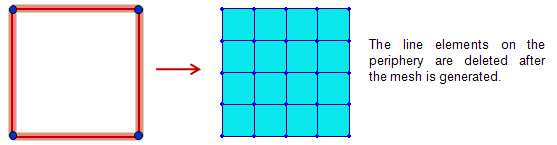
If this option is selected, the line elements on the periphery of the mesh area are deleted after the mesh is generated.
Subdivide
Boundary Line Elem.
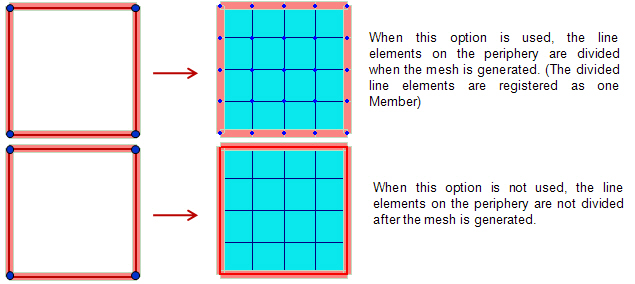
This option can be used when 'Delete Boundary Line Elem.' is not selected. If this option is selected, the line elements on the periphery of the mesh area are divided according to the mesh size. The divided line elements are registered as a Member and it can be checked in the Member Assignment dialog.