Soil Pressure
Check soil pressure contours on the beam, plate or solid elements representing subgrade beam, mat foundation or retaining wall.
From the Main Menu select Results > Results > Reactions > Soil Pressure.
 Load Cases/Combinations
Select a desired load case, load combination or envelope case.
Click  to the
right to enter new or modify existing load combinations. (Refer
to "Load Cases /
Combinations")
to the
right to enter new or modify existing load combinations. (Refer
to "Load Cases /
Combinations")
Step
Specify the step for which the analysis results are to be produced.
The Step is defined in geometric nonlinear analysis as Load Step,
and additional steps are defined in the construction stages of
high-rise buildings or heat of hydration analyses.
Components
Select the desired component among the following:
PX: Soil pressure in the global X-direction
PY: Soil pressure in the global Y-direction
PZ: Soil pressure in the global Z-direction
Local (if defined): Where nodes are assigned Node Local Axis, soil pressure is produced with respect to the local coordinate systems.
Note 1
Pressure contour can be displayed on the beam, plate and solid
elements which are assigned Point Spring Support or Distributed
Spring Support using the Surface
Spring Support function. Note
that Point Spring Support entered using the Model > Boundaries
> Point
Spring Support function is not considered in the calculation
of soil pressure.
Note 2
The soil pressure is calculated as the nodal reaction divided by
the effective area surrounding the relevant node. The effective
area is bounded by the center line of plate/solid element.

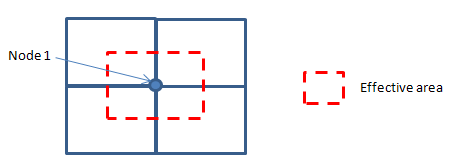
Type of Display
Define the type of display as follows :
 : Assign the color distribution range of contour.
Using the function, specific colors for specific ranges
can be assigned.
: Assign the color distribution range of contour.
Using the function, specific colors for specific ranges
can be assigned. : Control the colors by zones in the contour.
 then click
  Record to the right of the Animation control board
at the bottom of the working window.
Record to the right of the Animation control board
at the bottom of the working window. : Assign the method of compressing image data
Batch Output Generation (  ,
,  )
)
Given the types of analysis results for Graphic outputs, generate consecutively graphic outputs for selected load cases and combinations. A total number of files equal to the products of the numbers of checked items in the three columns of the dialog box below are created. (Details...)

 : Produce
the specified batch Graphic Files reflecting the contents
of the dialog box.
: Produce
the specified batch Graphic Files reflecting the contents
of the dialog box. /
/ 