Search Displacements
Check the displacement of a particular node in numerical values.
From the Main Menu select Results > Results > Deformations > Search Displacements.
 Load
Cases/Combinations
Load
Cases/Combinations
Select a desired load case, load combination or envelope case.
Click  to the right to enter
new or modify existing load combinations. (Refer to "Load
Cases / Combinations")
to the right to enter
new or modify existing load combinations. (Refer to "Load
Cases / Combinations")
Step
Specify the step for which the analysis results are to be produced.
The Step is defined in geometric nonlinear analysis as Load Step,
and additional steps are defined in the construction stages of
highrise buildings or heat of hydration analyses.
Note
The Construction Stage applicable for the output of the construction
stage analysis is defined in Select
Construction Stage for Display or Stage Toolbar.
Node Picking
 Node Number
Enter
the node number for which the displacement is to be checked, or
click the entry field and assign the node with the mouse in the
working window.
Note
When the node number is assigned, the following items are displayed
in the Message Window :
Node Number
DX: Displacement component in GCS X-direction
DY: Displacement component in GCS Y-direction
DZ: Displacement component in GCS Z-direction
DXYZ:
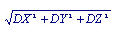
RX: Rotation component about GCS X-axis
RY: Rotation component about GCS Y-axis
RZ: Rotation component about GCS Z-axis
RW: Warping component s