Displacement Optimal Design
Section Optimization of structural steel and steel-concrete composite sections is carried out through iterative analysis based on the user defined displacement limit, analysis results and the results of design check. In the case of steel-concrete composite sections, the concrete section sizes and structural steel section sizes are changed in the process of optimization, and the section shape and the amount of reinforcing steel cannot be changed.
From the Main Menu select Design > Section > Displacement Optimal Design.
For optimization design per lateral design control, enter the lateral displacement limit and the condition of design limit.
 Disp. Control
Displacement
Enter the displacement control information related to wind loads.
Load Case Name: Wind load case for which lateral displacement will be controlled
Target Displacement: Maximum permitted displacement
Story Drift
Enter the inter-story drift control information related to seismic loads.
Load Case Name: Seismic load case for which inter-story drift will be controlled
Drift Ratio: Ratio of allowable inter-story drift to story height
RMFactor: Response Modification Factor
Scale: Scale-up Factor representing the ratio of static seismic base shear to that of response spectrum analysis
Unit Load
Load Case Name: Static load case name for a unit load
Node: Node number at which a unit load is acting
Angle (CCW): Direction of the unit load
 :
Add the lateral displacement/drift control data entered or add
a unit load.
:
Add the lateral displacement/drift control data entered or add
a unit load.
 :
Update lateral displacement/drift control data or a unit load,
which have been previously defined
:
Update lateral displacement/drift control data or a unit load,
which have been previously defined
 :
Delete the selected lateral displacement/drift control data or
a unit load.
:
Delete the selected lateral displacement/drift control data or
a unit load.
Global Parameter
Enter the design control limits for each member.
Member
Select the members (Steel Column, SRC Column, Beam & Brace) for which optimum design will be performed.
Sect. DB
Select the database for the members.
The program provides the database for
 ,
,  ,
,
 ,
,  ,
, 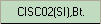 ,
,
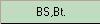 ,
, 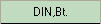 ,
,  ,
, 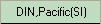 ,
,  ,
,  .
.
uses welded built-up sections whose
member dimensions are defined by D1-D6 and the thickness data
are defined in . If
is selected,
welded member sections defined in
. If
is selected,
welded member sections defined in  will be
used.
will be
used.
Max (H-B)
Enter the difference between the larger and smaller side dimensions.
Note
A square section will have a ??value for Max (H-B).
H
Height (depth) of a section
Min: Minimum dimension to be applied to optimal design
Max: Maximum dimension to be applied to optimal design
Inc: Dimensional increment between the minimum and maximum dimensions
B
Breadth (width) of a section
Min: Minimum dimension to be applied to optimal design
Max: Maximum dimension to be applied to optimal design
Inc: Dimensional increment between the minimum and maximum dimensions
Width-Thk. Ratio
Limit for width to thickness ratio
Auto: Auto-set to the maximum width to thickness ratio specified by the design standard
User: Maximum width to thickness ratio defined by User
No Limit: No limit for maximum width to thickness ratio imposed
Flange
Width to thickness ratio for Flange
Out: One end free and one end supported
In: Both ends supported
Web
Width to thickness ratio for Web
Out: One end free and one end supported
In: Both ends supported
Allowable Ratio
Allowable stress and strength ratio, which will become bases for optimal design
Column Section
Limiting condition for optimal design of columns
Default: Use optimally designed column sizes.
Uni-Sect: Use a uniform section for each story.
Optimum: Use optimally designed column sizes such that lower column section dimensions are larger than those for upper columns.
Parameter of Built Up Section
Built-Up Joint
Limitation for column sizes as to whether the outer or inner dimensions of columns (above and below) should be maintained (flushed)
External: Outside flushed
Internal: Inside flushed
Plate Thickness
Enter the thicknesses of flanges and webs to be used in optimal design.
Click  to prompt
the Plate Thickness Data entry dialog box.
to prompt
the Plate Thickness Data entry dialog box.
Thickness List: Thickness database
Selected List: Thicknesses selected from the database
 :
Select specific thicknesses in Thickness List and update Selected
List.
:
Select specific thicknesses in Thickness List and update Selected
List.
 :
Select all the thicknesses in Thickness List and update Selected
List.
:
Select all the thicknesses in Thickness List and update Selected
List.
 :
Delete all the selected thicknesses in Selected List.
:
Delete all the selected thicknesses in Selected List.
 :
Delete the selected thicknesses in Selected List.
:
Delete the selected thicknesses in Selected List.
User Input: Thickness is directly entered by User.
:
The user defined thickness is added to the Selected List.
Property Parameter
Enter the design control limits for each section.
Chk. Dgn. : Select the sections for which optimum design will be performed
ID : Section number
Origin Section : Display the dimension of the members entered by the user. This part cannot be modified
Section Name
Type : Section type
Size : Section size
Shape : Section shape
Para. : Select the design control limits to be applied to optimal design
G : Design control limit for every member type
P : Design control limit for every section type
Sect. DB
Select the database for the members. The program provides the database for 15 different types including AISC, BS, KS, etc.
Built-up sections are based on member dimensions (H & B) and the thickness data are defined in Plate Thk. If User is selected,
welded member sections defined by user in Use User Defined Section will be used.
Max (H-B)
Enter the difference between the larger and smaller side dimensions.
Note
A square section will have a ??value for Max (H-B).
H
Height (depth) of a section
Min: Minimum dimension to be applied to optimal design
Max: Maximum dimension to be applied to optimal design
Inc: Dimensional increment between the minimum and maximum dimensions
B
Breadth (width) of a section
Min: Minimum dimension to be applied to optimal design
Max: Maximum dimension to be applied to optimal design
Inc: Dimensional increment between the minimum and maximum dimensions
Width-Thickness Ratio
Limit for width to thickness ratio
Method
Auto: Auto-set to the maximum width to thickness ratio specified by the design standard
User: Maximum width to thickness ratio defined by User
No Limit: No limit for maximum width to thickness ratio imposed
F.Out: Width to thickness ratio for one end free and one end supported Flange
F.In: Both ends supported width to thickness ratio for Flange
W.Out: One end free and one end supported width to thickness ratio for Web
W.In: Both ends supported width to thickness ratio for Web
Allow
Allowable stress and strength ratio, which will become bases for optimal design
Uniform Sect.
Limiting condition for optimal design of columns
Default: Use optimally designed column sizes.
Uni-Sect: Use a uniform section for each story.
Optimum: Use optimally designed column sizes such that lower column section dimensions are larger than those for upper
columns.
Built-Up Joint
Limitation for column sizes as to whether the outer or inner dimensions of columns (above and below) should be maintained
(flushed)
External: Outside flushed
Internal: Inside flushed
Plate Thickness
Enter the thicknesses of flanges and webs to be used in optimal design.
Click to prompt
the Plate Thickness Data entry dialog box.
 : Select all sections for which optimal design will be performed
 : Cancel the selection of all sections.
 : Change the design control limit of the selected section.
 : Perform optional design.
Displacement Optimal
Design Results
Function
Display the output for optimization design per lateral displacement control, sort the optimal design results in various forms, and reflect the change of sections in the model.
Sect. ID : Section number
Sect. Name : Section name
Memb. Type : Member type
Origin Sect. : Member section defined by the user
Proposal Sect. Member section designed optimally
CHK : Display the status of strength verification results
COM : Combined stress ratio(Combined strength ratio) due to the strength verification results
LCB : Maximum combined stress ratio
Weight : Structure(1) and the total weight of the structure after optimal design
Steel : Total weight of steel
RC : Total weight of concrete
Max. Displacement : Maximum displacement for every load case
Max. Story Drift Ratio : Maximum story drift for every load case and the location
Output Data
 : Produce the results in a graphic format
 : Produce the results in a text format
:
Display the results in various forms of charts. The types of output
charts are as follows
Tread of Total Displ. Change : Variation graph of maximum displacement of each optimization step.
Displ. Participation Factor per Weight : Variation graph of displacement participation factor per unit weight for each member
section at each optimization step
Displ. Participation Fator : Variation graph of displacement participation factor for each member section at each optimization
step
Design Ratio and Steel Weight : Variation graph of combined stress ratio(Combined srength ratio) and variation graph of
steel weight for each member section before and after optimal design.
 : Incorporate
the sections designed optimally into the original model
: Incorporate
the sections designed optimally into the original model