Footing Design
Design spread and piled footings.
1. The service load combinations
for footing design must be defined prior to undertaking footing
design. Use Results > Combinations
to define the load combinations. Select the service and factored
loads in  .
.
2. The data entries are deleted when the program is terminated. The contents of the display window for calculation results cannot be saved.
3. The footing design can
be operated in two modes: Auto
Design and Code Check.
Use  to the right to convert from one mode
to the other.
to the right to convert from one mode
to the other.
Note
The reinforcing cover thickness (dc) of the footing does not change
due to a mode conversion.
4. The column size is set to the largest member size among all the members connected to the support node. For a circular section, the diameter is used for the column dimension. For other cross-sectional shapes, outer dimensions are used as rectangular shapes.
When the sectional dimensions of columns must be changed due
to pedestals or base plates, use  .
.
Can be accessed only in the Post-processing Mode.
From the Main Menu select Design > Design > RC Design > Footing Design.
 Multi-Footing Design
Function
Multi-Footing Design
Function
Generate multiple footing groups.
 : Reset the
Footing Design dialog box to the original state.
: Reset the
Footing Design dialog box to the original state.
 : Add a footing
group for multi-footing design.
: Add a footing
group for multi-footing design.
 : Delete
the current footing group.
: Delete
the current footing group.
Name
Enter the name of the footing to be designed. The name appears as the title of the output.
Node No
Enter the node numbers where the footings are located.
Click the node number field and pick the relevant nodes in the working window.
The node numbers can also be directly entered in the node number field.
Footing Size
Enter the footing data.
Lx : Footing dimension in X-axis
Ly : Footing dimension in Y-axis
The footing sizes are automatically calculated in the "Auto Design" mode of spread footings.
The pile cap sizes are automatically calculated based on the spacing between the piles and the edge distance. The user can not define the pile cap sizes.
Depth (D): Thickness of footing
Auto-calculated in "Auto Design" mode.
Cover Thk (dc): Concrete cover to the center of main rebars
Material Strength
The user may directly enter the values if not preassigned.
Concrete (f'c): Compression strength of concrete
Re-bar (fy): Yield strength of rebars
Re-bar Size
Enter the standard rebar sizes to be used. Only the designated sizes can be used. The rebars are designed using 3different sizes equal to and larger than the size specified.
X Direction: Standard rebar size in the X-direction
Y Direction: Standard rebar size in the Y-direction
Isolate FDN / Pile FDN
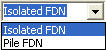
Convert the foundation type mode (Spread footing & Pile Cap).
Misc. Load
Specify additional loads to be considered in the design. The nodal reactions from the analysis results are automatically reflected.
Surcharge Load (Ws): Load per unit area on the surface
Soil Height (H): Height from the top of footing to the ground level
Soil Density (γq): Soil density
Major Axis
Select the direction of the major axis. The major axis is used to determine the effective depths of footing and layout the piles.
X Axis: Set X-axis as the major axis
Y Axis: Set Y-axis as the major axis
Select the service and factored load combinations for footing design.
Change the column (pedestal) sizes to be used in design.

Display the nodal reactions.

Change all types of parameters related to design.

The program automatically searches for an adequate footing size
and the number of piles. It looks for satisfactory dimensions
by checking all the entered nodes and load combinations. The results
are produced only for the node subjected to the most severe load
combination. When the node numbers determining the footing size
(Lx, Ly) and the thickness (depth) of the footing are different,
the calculation results are produced for the node that governs
the footing size.
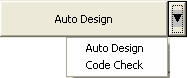
The arrow button to the right selects either Auto
Design or Code Check.

Calculations are based on the entered data, governed by the worst
load combination for footing design.
Isolate FDN
Function
Enter the required data for the design of spread footings.
Allowable Soil Pressure (Qe)
Pile FDN
Function
Enter the required data for the design of pile caps.
Pile
No.: Number of piles (maximum 24 piles).
Not required in "Auto Design" mode.
Size (dp): Diameter of a pile.
Space: Pile spacing (larger than 2.5 X dp).
Note
Appropriate pile placement is carried out by the program reflecting
the major axis and using the built-in database. The positions
of piles can not be changed separately.
Capacity
Compressive (Qa): Allowable compression capacity of a pile.
Tensile (|QaT|): Allowable tension capacity of a pile. Enter "0" when the piles cannot resist tension.
Load Combination
Select
Function
Select the service and factored load combinations for design.
Load combinations must be defined prior to designing foundation.
Service
Load Select
Select the load combinations in service loads in 'SEL"
to the left.
Factored
Load Select
Select the load combinations in factored loads in 'SEL"
to the right.
Change Column Size
Function
Change the sizes and shapes of the columns or pedestals.
Shape
Enter the shapes of columns or pedestals. Select  for rectangular
and
for rectangular
and  for circular
shapes.
for circular
shapes.
Cx
(Dia)
Rectangular column dimension in the X-direction or the diameter
of a circular column.
Cy
Rectangular column dimension in the Y-direction.
Reaction Force View
Function
Show the reaction forces.
Live load reduction factor is set to 1.0, if a value is not entered previously by the user. The displayed reaction values reflect the Live Load Reduction Factor.
Node
ID
Select the node number of interest. Only the numbers entered in
the Node ID field of the Foundation Design window can be selected.
When "Applied Forces and Moments" is set to "Axial
Forces Only" in the Option dialog box, Mx and My are set
to '0' irrespective of the true values of the reactions.
Option
Function
Change all types of parameters related to design.
Applied Forces and Moments
Axial
Forces and Moments
Design footings using axial forces and moments applied to the nodes.
Axial
Forces Only
Design footings using only the axial forces applied to the nodes.
If selected, the moment is set to '0' irrespective of the true
values of the reactions.
Size Increment (Isolate FDN)
Square (Lx=Ly): If selected in Auto-Design for spread footings, the transversal and longitudinal lengths of the footings are increased by the specified increment to design square footings.
If not selected, the dimensions of the footings are increased to appropriate ratios reflecting the applied moments and soil reactions. The ratios of the two sides do not exceed 2.
Design Parameter
Design
Code
Enter one of the following design codes:
ACI318-02: American Concrete Institute
ACI318-95: American Concrete Institute
BS8110-97: British Standard
KCI-USD99: Korean Concrete Institute
KCI-USD99(Build.): Korean Concrete Institute
KBC-USD05: Korean Building Code
KBC-USD05 (Build.): Korean Building Code
Strength
Reduction Factors
Enter strength reduction factors.
For
Flexure ( b):
Strength reduction factor for bending moment
b):
Strength reduction factor for bending moment
For
Shear (v): Strength
reduction factor for shear force
Footing Self Weight
Self
Weight Excluded
Design footings using only the reactions excluding the self-weights.
Self
Weight Included
Design forces include the self-weights in addition to the reactions.
Footing
Density
Enter the footing density.
Pile End Distance
Auto
Calculation
Auto-calculate the end distance of piles. The end distance is calculated
as 1.25 X pile diameter.
Or, the user may directly enter the pile end distance.
Produce Calculation Results
1. Geometry and Materials
Display the size, strength, etc.
2. Design Condition
Design Code: Applied design code
Selected Node No: Node numbers entered by the user
Design Node No: Design node number with the most severe design condition.
Design Load Combination
Service: The most severe load combination in service loads.
Factored: The most severe load combination in factored loads.
Applied Loads : Applied design loads.
Ps, Msx, Msy : Combined service loads.
Pu, Mux, Muy : Combined factored loads.
3. Soil Bearing Pressure Check (Spread footing)
Actual
Pressure
Calculated reactions in service loads (for allowable soil pressure
checking)
Soil pressure is calculated based on the sum of the footing self-weight,
the earth load above the footing and the surcharge (if entered
by the user).
Design Pressure: Calculated reactions in factored loads (for footing design)
The reactions for concrete design do not consider the self-weight, earth load and the surcharge.
4. Pile Bearing Capacity Check (Pile Cap)
Display the calculated pile reactions.
5. Shear Check
One
Way Shear
Display the results of checking one-way shear strength.
If the shear failure line crosses the pile heads in pile cap footings,
the tributary cross-section areas are calculated and reflected
in the calculation of shear force.
Punching
Shear
Display the results of checking two-way shear strength.
The effective depth used to calculate the shear strength is determined
by subtracting [cover thickness entered by the user + diameter
of the main rebars] from the footing depth.
Vup and Vnp are based
on the maximum pile reaction. The critical punching shear failure
plane is located d/2 away from the pile face.
6. Bending Moment Check
Display the quantity and spacing of rebars for the applied bending moments.
Effective depth (d) for major axis : Footing depth (D) - Cover Thk.(dc)
Effective depth (d) for minor axis : Footing depth (D) - [cover thickness (dc) + main rebar diameter]
The minimum rebars are calculated using the minimum temperature rebars. The maximum rebars are not calculated.
X-X
Axis (Y Direction)
Calculation results due to moment about X-axis (for reinforcement
in the Y-direction).
Y-Y
Axis (X Direction)
Calculation results due to moment about Y-axis (for reinforcement
in the X-direction).
Required
Space
The spacing of rebars calculated.
Max.
Space
Maximum rebar spacing based on code requirements.