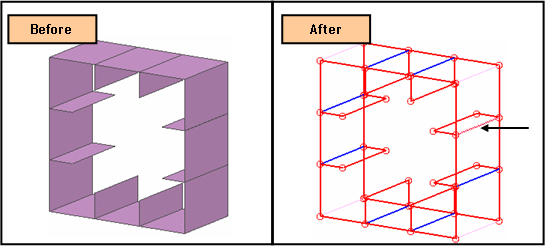
Check: Shape

Function
Check Shape displays the boundary representation for a targeted object. A target object is selected first before invoking Check Shape.
Call
Geometry
> Check > Shape 
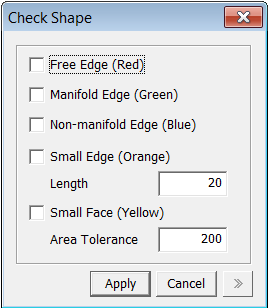
<Check Shape>
Free Edge (Red)
Represent Free Edge with red color on Work Window. Text is showed on Output Window.
Manifold Edge(Green)
Represent Manifold Edge with green color on Work Window. Text is showed on Output Window.
Non-manifold Edge(Blue)
Represent Non-manifold with blue color on Work Window. Text is showed on Output Window.
Small Edge(Orange)
Check Small Edge that is smaller than Length Tolerance and represent that one with orange color on Work Window. Text is showed on Output Window.
Small Face(Yellow)
Check Small Face that is smaller than specified Area Tolerance and represent that one with yellow color on Work Window. Text is showed on Output Window.
Notes
Non Manifold Edge is the intersection of three or more Faces.
Manifold Edge is the intersection of two Faces.