Transform: Sweep-Translate

Function
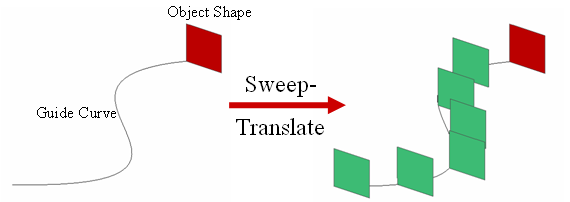
Copy selected objects along a guide by a specified distance. The original objects may or may not be kept while creating new copied objects.
Call
Geometry > Transform > Sweep-Translate
<Sweep-Translate>
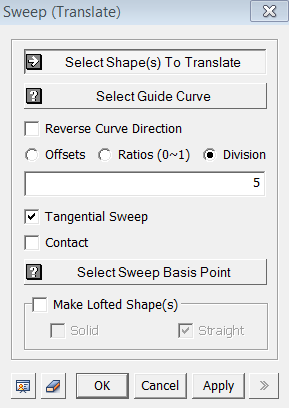
Select Shape(s) To Translate
Select objects to be translated.
Select Guide Curve
Select a Guide Curve (Edge, Wire).
Reverse Curve Direction
This
option will reverse the direction of Guide Curve. As a result, the final
shape will be formed in opposite direction.
Offsets
Define the translating distance by entering offset intervals.
If the total length of given intervals is longer than the actual length
of Guide Curve, it will be translated until the end of Guide Curve. Multiple
offset intervals can be defined by using a blank or a comma.
Ratios(0~1)
Define the translating distance by ratio of the Guide
Curve. The start of Guide Curve is "0," and the end is "1."
A combination of ratio can be enter to copy more
than once.
Division
Define the translating distance by virtually dividing
the Guide Curve.
Tangential Sweep
This option reflects the curvature of Guide Curve on newly
copied objects.
Contact
This option will translate objects after moving it at
the beginning of Guide Curve.
Select Sweep Basis Vertex
Select a reference vertex for Tangential Sweep and/or Contact Options. The vertex must be located in the translating objects.
Make Lofted Shape(s)
Solid / Straight
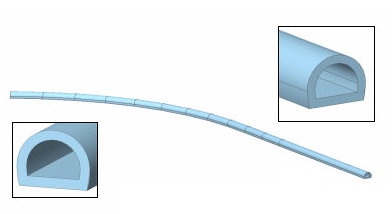
When the curvature of a Guide Curve is discontinuous (numerically unstable), this function can replace the Loft function to make a continuous shape along the Guide Curve.
If this option is checked, only the result shape remains, and none of original shape is copied along the Guide Curve.