Size Control: Match Edge Seed

Function
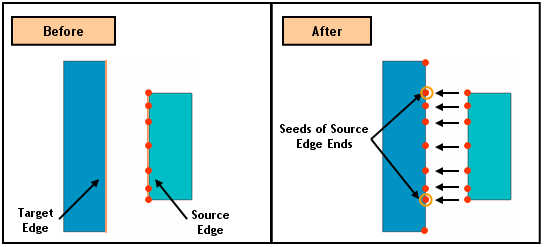
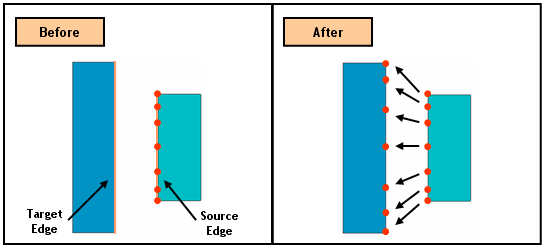
Match Edge Seed duplicates a seeding information from an assigned Edge(s) (Source Edge) to a Target Edge.
Call
Mesh > Size Control > Match Edge Seeds
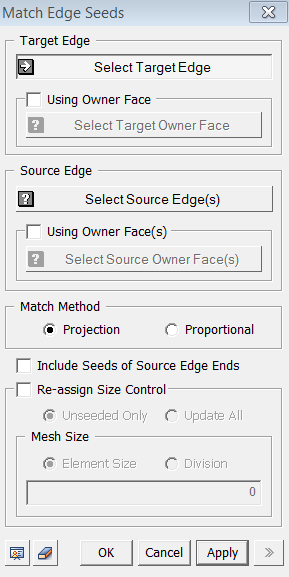
<Match Edge Seeds>
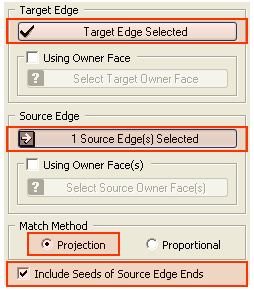
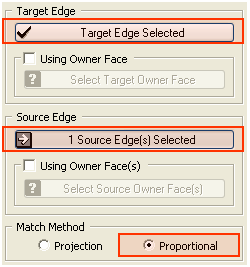
Target Edge
Select Target Edge
Select
an Edge for which a mesh size will be specified.
Using Owner Face
If the
selection of a Target Edge is difficult in the Work Window, the user can
select the owner Face which contains the Edge, and then only its sub-Edges
can be selected as Target Edge.
Source Edge
Select Source Edge
Select
an Edge from which a mesh size will be brought.
Using Owner Face
If the
selection of a Source Edge is difficult in the Work Window, the user can
select the owner Face which contains the Edge, and thn
only its sub-Edges can be selected as Target Edge.
Match Method
Projection
This
method matches the size information by projecting in orthogonal direction.
See example.
Proportional
This
method matches the size information based on the proportional ratio of
source seeding. See example.
Include Seeds of Source Edge Ends
When
Source Edge is longer than he Target Edge, the ends of the Source Edge
can be considered as seeds on Target Edge during Projection Match Method
Re-assign Size Control
This option enables adding or modifying size information on Source Edge. The same seeding information will be delivered to the Target Edge.
Unseeded Only
Assign
size control only to the unseeded Source Edge(s).
Update All
Assign size control to all Source Edge(s).
Mesh
Size
Element Size
Specify the element size.
Division
Specify the number of elements to be created along the selected edges.