Load: Response Spectrum Load Set

Function
Enter the Load Sets, spectrum functions and loading directions for response spectrum analysis.
Call
Model > Load > Response Spectrum Analysis Data > Response Spectrum Load Set

<Response Spectrum Load Set>
Load Set Name
Enter
the name of the Response Spectrum Load Set.
Description
Enter
a brief description of the Load Set.
Spectrum Function
Function Name
Select a spectrum function name. If spectral
functions have not been defined, click  to add new function .
Direction
Select
the GCS direction of the response spectrum loads.
Direction Vector
Displays the selected direction in vector.
Scale Factor
Scale
factor for the entered response spectrum excitation
Period Modification Factor
A multiplying
factor for periods calculated by Eigenvalue analysis. This factor applies
to all the natural periods calculated by Eigenvalue analysis for response
spectrum analysis. This functionality becomes useful, for example, when
the user wants to account for the stiffness contribution of non-structural
elements, in which case the user may prefer to reduce the calculated periods.
Damping
Damping Ratio
Enter
a damping ratio
Correction by Damping Ratio
When
a single spectrum is selected, a modifying equation is used to adjust
the spectrum applied to each mode having a corresponding damping ratio.
Click  to prompt the Damping
Method dialog box.
to prompt the Damping
Method dialog box.
<Damping Method>
Direct Modal
The
user defines the damping ratio for each mode, and the modal response is
calculated based on the spectrum function, which is modified by the user-defined
damping ratio.

<Damping Method - Direct Modal>
Direct Specification of Modal Damping
Directly
Specify the damping ratio for each mode.
Damping Ratio for All Modes
It applies to every mode except the ones that the user has directly specified. It applies to all the modes other than the damping ratios assigned to the specific modes in the Modal Damping Overrides table below. When the entered damping ratio is different from the user-defined damping ratio in Response Spectrum Functions, the previous spectrum data will be interpolated based on this damping ratio.
Modal Damping Overrides
The
user directly defines the damping ratio for each mode.
Mode
Mode Number
Damping Ratio
Damping
ratio for each mode
 : to add a new damping ratio
 : to modify the existing damping ratio
 : to remove the existing damping ratio
Mass & Stiffness Proportional
Using
the dynamic property and the modal damping ratios of two modes, the damping
matrix, which is proportional to Mass and Stiffness, is generated. This
damping matrix evaluates the damping ratio for each mode, and the response
spectrum analysis is carried out while reflecting the modal damping ratio.
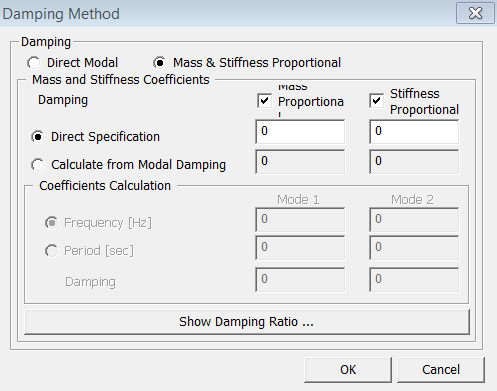
<Damping Method - Mass & Stiffness Proportional>
Damping Type
Select
if the damping matrix is proportional to Mass or to Stiffness.
Direct Specification
The user directly defines the proportional coefficients for the checked Damping Type.
Cal. from Modal Damping
Using
the modal damping ratios that are specified by the user , it automatically
calculates and inputs the proportional coefficients.
Coefficients Calculation
If
either Mass or Stiffness Proportional is checked in Damping Type, modal
damping ratio of only one mode can be entered. If both are checked, modal
damping ratios of two modes can be specified.
Frequency [Hz]
Enter the frequency of the corresponding mode to be assigned a damping ratio for calculating proportional coefficients.
Period [Sec]
Enter the period of the corresponding mode to be assigned a damping ratio for calculating proportional coefficients.
Damping Ratio
Enter
the damping ratio corresponding to the specified frequency or the period.
 : It calculates
the damping ratio based on the entered proportional coefficient and the
frequency or the period. Since damping ratios for only two modes can be
specified to reflect the damping effect of mass or stiffness proportional,
this tool makes it possible to calculate damping ratios for the other
modes.
: It calculates
the damping ratio based on the entered proportional coefficient and the
frequency or the period. Since damping ratios for only two modes can be
specified to reflect the damping effect of mass or stiffness proportional,
this tool makes it possible to calculate damping ratios for the other
modes.
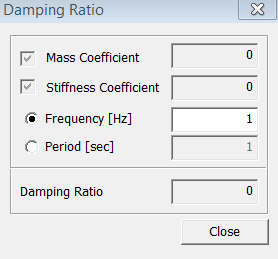
<Damping Ratio>
Interpolation of Spectral Data
Select the method of interpolating the response spectrum load data.
Linear
Linear interpolation method.
Logarithm
Log-scale
interpolation method.
: Enter new or additional response spectrum analysis load sets
: Modify previously entered response spectrum analysis load sets
: Delete previously entered response spectrum analysis load sets