Tunnel Modeling Wizard: Step 2 : Shotcrete & Rock Bolts

Function
Tunnel Modeling Wizard (TMW) automates almost all the time-consuming operations of three dimensional modelling and produces output data reports for swift interpretation of analysis results. With respect to the enhancement to pre-processing, it provides various tunnel templates, NATM tunnelling method, advanced surface modelling tool for terrain and strata, and automatic hexahedral mesh generation. In addition, results of construction stage analysis are generated in an MS-Excel file, which is the most widely used data-entry software.
The general modelling procedure for TMW consists of 5 major steps: (a) configuration of a tunnel cross section and excavation type; (b) specification of shotcrete and rock bolts; (c) definition of excavation and construction stages; (d) configuration of mesh data with terrain and strata; and (e) preparation of reports with output data.
In the Shotcrete and Rock Bolts tab, the parameters for shotcrete and rock bolts, which are considered as general reinforcements in a NATM tunnel, are defined. If shotcrete is installed, it is configured for material, thickness and hardening property for the transition from the initial soft shotcrete. Similarly, section property and position arrangement can be established for rock bolt material. With the defined parameters, TMW models shotcrete with shell elements, and rock bolts with embedded truss elements which can retain element stiffness regardless of mesh connectivity
Call
Model > Tunnel Modeling Wizard
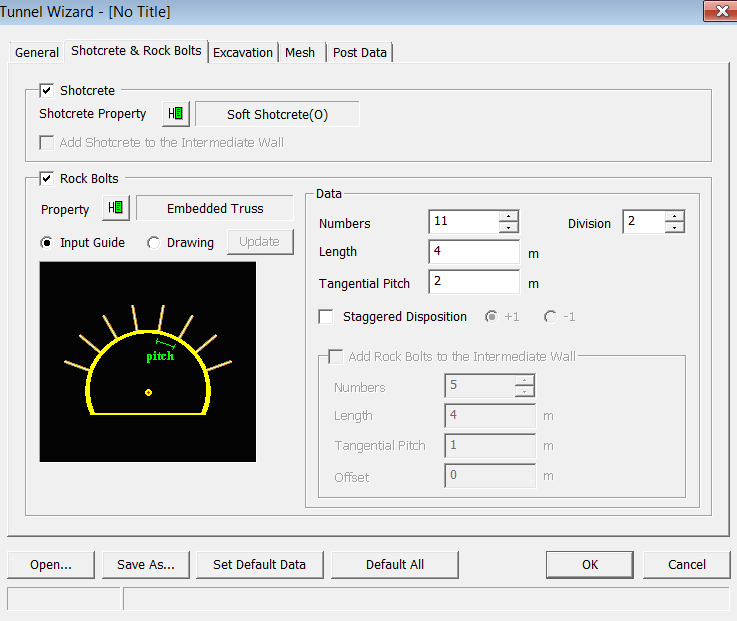
<Tunnel Wizard-Shotcrete & Rock Bolts>
Shotcrete
Determine
whether or not to create Shotcrete elements. Click button to define the shotcrete material property
in the Shotcrete Property dialog box.
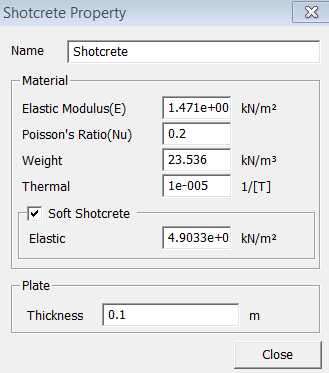
<Tunnel Wizard-Shotcrete Property>
Name
Enter
the name of the shotcrete property.
Material
Define
the shotcrete material parameters.
Elastic Modulus
Poisson's Ratio
Weight Density
Thermal Coefficient
Soft Shotcrete
Soft Shotcrete considers the soft material property at the initial stage of installation. By entering the Elastic Modulus of Soft Shotcrete, TMW automatically creates a model with the shotcrete hardening effect.
Thickness
Enter
the thickness of shotcrete plate element.
Add Shotcrete to the Intermediate Wall
This
option installs the shotcrete element at the intermediate wall.
Rock Bolts
Determine
whether or not to create rock bolts elements. Click button to define the rock bolt material property
in the Rock Bolt Property dialog box.
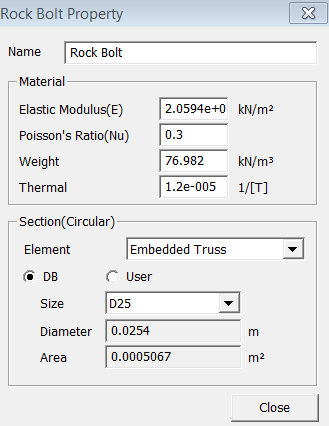
<Tunnel Wizard-Rock Bolt Property>
Name
Enter
the name of the rock bolt property.
Material
Define
the rock bolt material parameters.
Elastic Modulus
Poisson's Ratio
Weight Density
Thermal Coefficient
Section
Enter
the section property of the Rock Bolt.
Element Type
Enter na element type for the rock bolts. TMW provides only the Embedded Truss element for a rock bolt.
DB
Use a section database which contains the most frequently used diameter sections.
User
Define
a section directly without using database.
Input Guide
It displays
a figure which shows the necessary parameters to locate rock bolts.
Drawing
It displays
a figure which shows the defined tunnel section in scale. Click  button to update
the figure.
button to update
the figure.
Data
Specify
the necessary parameters to define a rock bolt.
Numbers
Enter the number of rock bolts.
Division
Enter the number of elements in each rock bolt.
Length
Enter the total length of rock bolt.
Tangential Pitch
Enter the tangential pitch between the rock bolts.
Staggered Disposition
This option enables the user to locate the rock bolts in a staggered position. If '+1' is selected, the rock bolts are installed by the specified number of rock bolts in the first stage. The second stage gains one rock bolt, and the third stage returns back to the original number. This pattern is also applied to the other stages.
Add Rock Bolts to the Intermediate Wall
This
option installs the rock bolt element at the intermediate wall. This option
becomes active when the excavation method is set to CD Cut
Numbers
Enter the number of rock bolts at the intermediate wall.
Length
Enter the length of a rock bolt.
Tangential Pitch
Enter the tangential pitch between rock bolts.
Offset
Enter
the offset distance from the top of the tunnel crown to the first rock
bolt.
.png)
Open
a Tunnel Wizard Save file (*.wzd).

Save
the current data to a Tunnel Wizard Save file (*.wzd).
Make
the current data as the default of TMW.

Reset all data to the default data.
Notes
Please refer to Basic Tutorial 2 for more details on the functions of TMW.