Compound

Function
Compound combines a number of independent shapes into a single compound. No Compound mode exists in Selection Filter, and it cannot become an object for meshing. A compound is merely a set of shapes.
Call
Main Menu : Geometry > Compound...
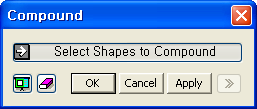
<Compound>
Select Shape(s) to Compound
Select shapes to be combined into a compound.
Notes
In the case of Divide Solid, where solids are combined in a Compound, dividing a solid also divides the faces of adjacent solids along the divided solid. This ensures the connectivity of elements. While Divide Solid, etc. can be operated on one object at a time, if a number of solids are combined in a compound, Divide Solid, etc. can be operated on multiple solids.
A compound is created when a shape is completely separated into two shapes through modifying operations. For example, when the four faces of a box is removed by the Remove Sub-Face menu, the shape then contains only the top and bottom faces completely separated. The two faces remain as a compound.
A Compound is also created in the process of making shapes, which can not be connected, into a single shape. For example, if a Boolean Fuse operation is carried out on two completely separated solids, they remain as a compound.
As such if compounds are created in the process of modeling, it is necessary to execute Explode to identify the problematic shapes, which can not be connected..