AISC2K(US): American Institute of Steel Construction,
2000 US Unit : lb, in
AISC2K(SI): American Institute of Steel Construction,
2000 SI Unit : kN, m, mm
AISC: American Institute of Steel Construction
CISC02(US): Canadian Institute of Steel Construction
(US Unit : lb, in)
CISC02(SI): Canadian Institute of Steel Construction
(SI Unit : kN, m, mm)
BS(S): British Standard
Note
BS indicates BS4-1 revised
prior to 1993.
BS4 - 93: British Standard / BS 4-1 : 1993
DIN(S): Deutches Institut fur Normung e.v
JIS2K : Japanese Industrial Standards 2000
JIS: Japanese Industrial Standards
KS: Korean Industrial Standards
GB-YB: Guojia Biao Zhun-Yejin Bu Biao Zhun
Pacific(SI): Bentley Pacific Standards (SI
Unit : kN, m, mm)
IS1161: Indian Standards
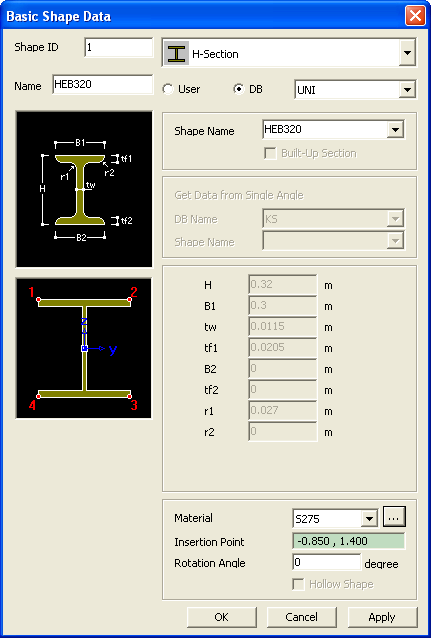
Material
Select the material from
the drop-down list. Click to modify the material properties if necessary.
Insertion Point
Enter the coordinates on the model view where
the centroid of the shape will be placed.
Rotation
Angle
Enter the angle by which
the shape will be rotated about its centroid. Even though the rotation
angle is entered, the local axis of the section will not be changed. The
local y- and z-axis are always parallel to UCS Y- and Z- axis respectively.
Hollow Shape
Check on to create a hollow
shape. This option is activated in Solid Rectangle, Solid Octagon, Half
Track, and Solid Round shapes.
Note
In
order to create a hole in a shape, create the solid shape and then create
hollow shape on the solid shape. Holes can be created in user defined
basic shapes and general shapes.
 and Select
 Shape ID
 to modify the material properties if necessary.
 Insertion Point