Function
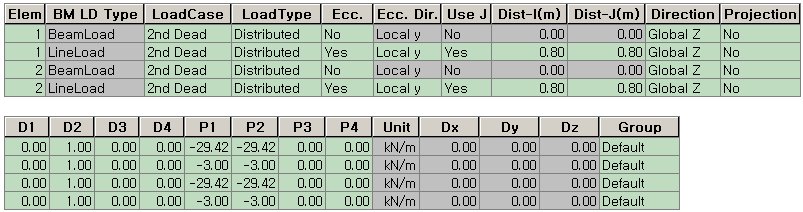
Enter or modify beam loads such as distributed or concentrated loads in a spreadsheet format table.
Table Tool in MIDAS/Gen is powerful and contains a large variety of built-in functions. Refer to the following items for detail directions:
BM
LD Type: Beam load type automatically displayed according to the
way in which the data were entered (Beam
Load, Floor Load, Use Temporary,
Prestress,
Moving
Load, Live Load, Typical Load)
Basic directions (Cell motion, selection, size control, etc.)
Data manipulation (Add, delete, modify data, etc.)
Copy/Paste data using clipboard
Supplementary functions by Table types
Call
From the Main Menu select Load > Load Tables > Beam Loads.
Select Structure Tables > Static Loads > Element Beam Loads in the Tables tab of the Tree Menu.
Shortcut key: [Ctrl]+[Shift]+M
Entry (Refer to "Element Beam Loads")
Refer to Usage of Table Tool and enter or modify the following data:
Element: Element numbers
BM LD Type: Beam load type automatically displayed according to the way in which the data were entered
(Beam Load, Floor Load, Line Load, Typical Load)
LoadCase: Select the unit load case of a beam load
LoadType: Select the application type of a beam load
Ecc.: Displays whether or not eccentricity was inputted
Ecc. Dir.: Direction of eccentricity
Use J:
Displays if eccentricity was used at  node
node
Dist-I(m):
Eccentricity distance from node
Dist-J(m):
Eccentricity distance from node
Direction: Select the loading direction of a beam load
Projection: Select whether or not the beam load is to be projected
D1 ~ D4: Loading positions of the beam load (4)
P1 ~ P4: Load values at the loading positions D1 ~ D4
Unit: Units for the beam loads (automatic display)
Dx: GCS X-component of the beam load due to floor loads entered in a particular direction (automatic display)
Dy: GCS Y-component of the beam load due to floor loads entered in a particular direction (automatic display)
Dz: GCS Z-component of the beam load due to floor loads entered in a particular direction (automatic display)
Group: Name of Load Group
Note
When the floor loads are applied in
the local plane coordinate system and converted into beam loads, the directions
of the beam loads and the floor loads coincide. The loading directions
of the converted beam loads are expressed by the component vectors relative
to each GCS direction.