Function
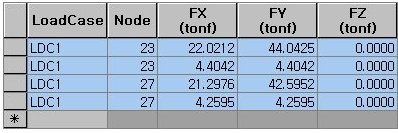
Enter or modify Nodal Body Force at specific nodes in a spreadsheet format table.
Table Tool in MIDAS/Gen is powerful and contains a large variety of built-in functions. Refer to the following items for detail directions:
Usage of Table Tool
Basic directions (Cell motion, selection, size control, etc.)
Data manipulation (Add, delete, modify data, etc.)
Copy/Paste data using clipboard
Supplementary functions by Table types
Call
From the Main Menu select Load > Load Tables > Nodal Body Forces.
Select Structure Tables > Static Loads > Nodal Body Forces in the Tables tab of the Tree Menu.
Entry
(Refer to "Nodal Body Forces" )
Refer to Usage of Table Tool and enter or modify the following data:
Load Case: Select unit load cases
Node: Node numbers
FX: Concentrated load component in GCS X-direction
FY: Concentrated load component in GCS Y-direction
FZ: Concentrated load component in GCS Z-direction
Note
Body Force Factor entered at each node is displayed in this table.