.jpg) Search Reaction Forces/Moments in the Icon Menu.
Search Reaction Forces/Moments in the Icon Menu.Function
Check the reactions at a particular support in numerical values.
Call
From the Main Menu select Results > Reactions > Search Reaction Forces/Moments.
Select Results > Reactions > Search Reaction Forces/Moments in the Menu tab of the Tree Menu.
Click Search Reaction Forces/Moments in the Icon Menu.
Usage
|
|
|
 Node Picking
Assign a node for which reactions are to be checked.
 Node Number: Enter the node number of a support, or
click the entry field then click a support in the working window.
Node Number: Enter the node number of a support, or
click the entry field then click a support in the working window.
Note
When the node number is assigned, the following items are displayed in
the Message Window:
Node Number: Support node number
FX: Reaction component in GCS X-direction
FY: Reaction component in GCS Y-direction
FZ: Reaction component in GCS Z-direction
FXYZ:

MX: Moment reaction component about GCS X-axis
MY: Moment reaction component about GCS Y-axis
MZ: Moment reaction component about GCS Z-axis
Fx: Reaction component in the Node's local x-direction (when the node's local coordinate system is defined)
Fy: Reaction component in the Node's local y-direction (when the node's local coordinate system is defined)
Fz: Reaction component in the Node's local z-direction (when the node's local coordinate system is defined)
Fxyz:
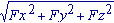 (when the node's local coordinate system is defined)
Mx: Moment reaction component about the Node's local x-axis (when the node's local coordinate system is defined)
My: Moment reaction component about the Node's local y-axis (when the node's local coordinate system is defined)
Mz: Moment reaction component about the Node's local z-axis (when the node's local coordinate system is defined)
.jpg)
 to the right to enter
new or modify existing load combinations. (Refer to "
to the right to enter
new or modify existing load combinations. (Refer to "