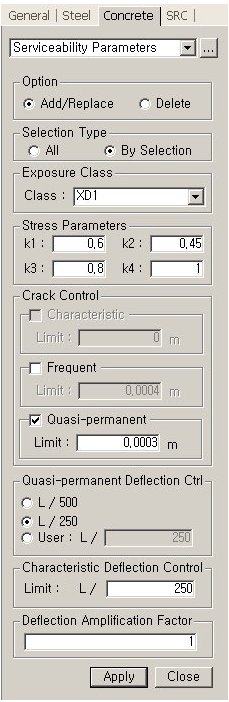
Select a beam member from the Model View to enter the following parameters:
 Option
Add/Replace: Add a new value or modify a predefined value.
Delete: Delete a predefined value.
Selection
Type
Select all the members (밃ll? or select the members by using 밄y Selection?
Exposure
Class
Select the Exposure Class (For further details, refer to Table 4.1 of EN 1992-1-1:2004(E)).
Note
Depending on the selected Exposure Class, Stress Parameters and Crack Control
options are automatically inputted and, in addition, can be modified by
the user.
Stress
Parameters
Enter the strength reduction coefficients.
Crack
Control
Enter the limiting crack widths.
Note
Crack Control menus become activated or inactivated depending upon the
Exposure Class.
Quasi-permanent
Deflection Ctrl
Enter the limiting deflections for Quasi-permanent combination of loads.
Characteristic
Deflection Ctrl
Enter the limiting deflections for Characteristic combination of loads.
Deflection
Amplification Factor
Enter the Deflection Amplification Factor.