From the Main
Menu select Load > Time History Analysis Data > Dynamic Nodal
Loads.
Select Time History
Analysis Data > Dynamic Nodal Loads in the Menu tab of the Tree Menu.
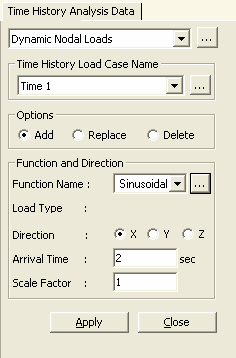
Load Case Name
Select a time history analysis load case
entered in "Time History Load
Cases". Click to define the relevant function if
the load case has not been previously defined.
Options
Add:
To add to previously entered time forcing functions at specific nodes.
Replace:
To replace previously entered time forcing functions at specific nodes.
Delete:
To delete previously entered time forcing functions at specific nodes.
Function and Direction
Specify the time forcing function, loading
direction and arrival time.
Function
Name: Select a time forcing function defined in "Time
Forcing Functions".Only Force or Moment type functions can be
selected.
Load Type:
Type of the selected time history forcing function
Direction:
Select the loading direction of the time forcing function.
X:
GCS X-direction
Y:
GCS Y-direction
Z:
GCS Z-direction
Arrival
Time: "Delay" time for the time forcing function. Enter
the delay time when the time forcing function is applied some time after
the time history analysis is initiated. For the time history analysis
due to vehicle loads, adjust the Arrival Time at each node to consider
the effect of moving loads.
Scale Factor:
Scale factor for the time forcing function
After defining the above items, select the
nodes to be loaded and click to apply the time forcing
function to the nodes. Use "Display"
to check the data entry.
 Load Case Name
 to define the relevant function if
the load case has not been previously defined.
to define the relevant function if
the load case has not been previously defined. to apply the time forcing
function to the nodes. Use "
to apply the time forcing
function to the nodes. Use "