Pushover Load Case
Enter, modify or delete load cases and analysis conditions for pushover analysis.
From the Main Menu select Pushover > Load Cases > Pushover Load Case.
Click the to create new load cases. Click the
  to confirm or modify and the
  to delete the data entry.
-
If Load Control is selected, pushover analysis is carried out to reach the estimated collapse load (Qud) through the load increments.
 Load Case Name
Enter the load case name pertaining to Pushover analysis.
DescriptionState a brief description related to the pushover load case.
General ControlIncremental Steps (nstep) : Number of steps to reach the estimated collapse load
Note
The incremental steps must be entered as a positive integer value (nstep≥1), and minimum 20 steps are recommended. (Default = 20)
Consider P-Delta Effect : Check on to consider P-Delta geometric nonlinear effects.
Note 1
P-Delta effect is very important in pushover analysis. Lateral displacement caused by the lateral load can be magnified by the gravitational load and this effect can reduce the lateral stiffness of the structure. Especially when plastic hinges occur at the lower part of the columns, which are under large axial forces, the reduced lateral stiffness can cause the collapse of the structure.
Note 2
Tthe stiffness rapidly decreases after reaching peak strength in case of FEMA and Eurocode type hinge, while geometric stiffness is neglected after reaching ultimate strength, i.e. Collapse Prevention (CP) and Near Collapse (NC), respectively.
Initial LoadAccumulate the reaction/story shear/displacement due to the initial load to the pushover analysis result.
Use Initial Load
Reaction / Story Shear by Initial Load : Accumulate the reaction/story shear due to the initial load
Displacement by Initial Load : Accumulate the displacement due to the initial load
Note 1
When P-M interaction is considered, the user needs to apply the initial load.
Note 2
When importing the static analysis result (ST) and the construction stage analysis result (CS), reaction and displacement are not cumulated.
Stepping Control OptionSpecify the control data for the load increment.
Auto-Stepping Control : The applied load (Qud) is divided by the automatically calculated load parameters. The first step is loaded up to 90% of the elastic limit of the structure. Further steps are automatically divided by the ratio of
 .
.Note 1
Elastic limit means the estimated load under which the first yield occurs.
Note 2 Analysis method and example for the Auto-Stepping Control option
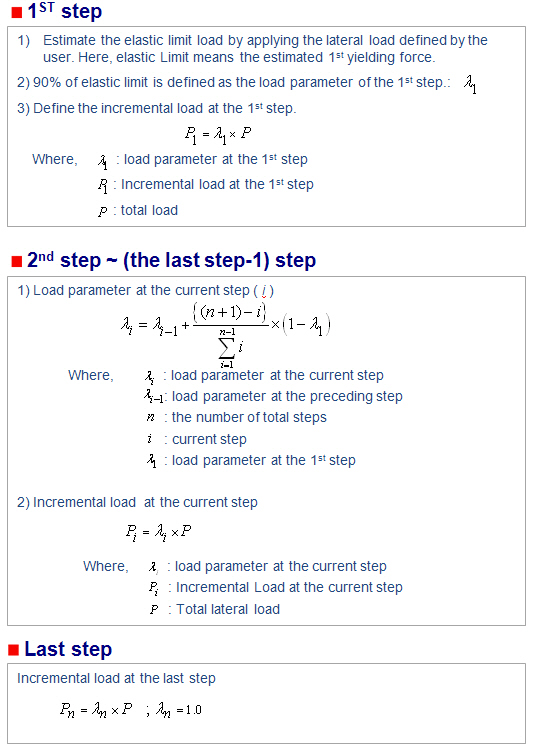
Example

Equal Step (1/n step) :The applied load (Qud) is equally divided by the number of nstep.
Incremental Control Function : The applied load (Qud) is divided by the user-defined function. Refer to Design>Pushover Analysis>Pushover Increment Functions to see how to define user-defined function.
Analysis Stopping ConditionSpecify the condition of termination of Pushover analysis.
Current Stiffness Ratio (Cs) : If the Current Stiffness Ratio (Cs) is entered and the ratio of the stiffness at the current an incremental step to the initial stiffness reaches the specified value, the analysis is terminated. For example, if the user specifies the Current Stiffness Ratio as 5%, analysis will be terminated when the ratio of the current stiffness to the initial stiffness becomes 0.05.
Note
In addition to the above conditions for termination of analysis, analysis is also terminated if the maximum number of increments is reached, or negative values are encountered in the stiffness matrix.
Limit Inter-Story Deformation Angle : If the Limit Inter-Story Deformation Angle is entered and the maximum Inter-Story Deformation Angle reaches the specified value, the analysis is terminated. (Default=1/10)
Load Case(Qud)Define the type of load pattern (ratio of magnitude) to be applied to pushover analysis
Load Type
Static Load Case: Use the load pattern of static load cases that have been defined.
Note
The combination of load cases multiplied by the corresponding scale factors is used as the load pattern.
Uniform Acceleration: The load is distributed relative to the inertia forces developed in the structure, which has been subject to a uniform acceleration. If the acceleration is uniform, the load pattern is determined proportionally to the mass at each story level.
Note. Calculation of Transformation Factor in EC8/Masonry and NTC 2008 for Load pattern Uniform Acceleration
The value of gamma obtained for EC8/Masonry and NTC 2008 will always be 1.
Gamma is defined as:
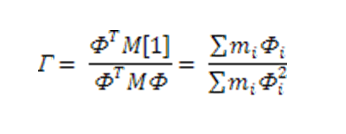
Since the mode shape is such that the displacement of all the stories is assumed to be 1. Hence whatever be the weight of the story the gamma will always be 1.
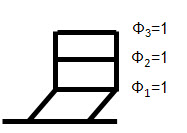
Assumed Mode Shape for Uniform Acceleration
Mode Shape: The pushover load pattern retains a mode shape and as such, eigenvalue analysis is a prerequisite. The user can select the orders of natural modes that are applied to determining the pushover load pattern.
Normalized Mode Shape* Mass: The Load pattern for the pushover analysis is obtained by the normalized mode shape*mass.

Normalization of Mode Shape
Note 1. Choice of Master Node
It is recommended that the master node be the node at the centre of mass of the structure so that the normalized mode shape is such that the normalized value of phi for centre of mass at roof becomes 1.
Note 2. Generation of Lateral Load Pattern of "Mode Shape*Mass"
The following is an example of how the lateral load pattern is obtained:

Note. Calculation of Transformation Factor in EC8/Masonry and NTC2008 for Load Case Normalized Mode Shape * Massand Mode Shape
Gamma can be calculated in the following two ways:
1. Based on 2D Behaviour (EC8-1:2004 Annex B)
2. Based on 3D Behaviour
1. Based on 2D Behaviour (EC8-1:2004 Annex B):
2D Behavior is based on EC8 -1 :2004 Annex B and determines the value of gamma by only considering the direction in which pushover analysis is performed .
Hence the value of gamma is :
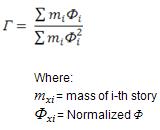
2. Based on 3D Behaviour: 3D Behavior determines the gamma by considering lateral deflection in all the possible directions.
Hence the value of gamma becomes:

Load Case/Direction/Mode: Specify the load cases/directions/mode related to the specified load type.
Note 1
For the Static Load Cases: All the static load cases are activated.
For the Uniform Acceleration: Load distribution directions (DX, DY, DZ) are activated.
For the Mode Shape and Mode Shape * Mass: The User directly enters the mode. For this option, eigenvalue analysis must precede pushover analysis.
Note 2
If the following temperature loads are entered in the Load Pattern input box, pushover analysis cannot be performed.
1. Beam Section Temperature
2. Temperature Gradient
3. System Temperature
4. Nodal Temperature
5. Element Temperature
-
If Displacement Control is selected
If Displacement Control is selected, pushover analysis is carried out to reach the target displacement through the incremental displacements.
Load Case NameEnter the load case name pertaining to Pushover analysis.
DescriptionState a brief description related to the pushover load case.
General ControlSpecify the general control data for nonlinear analysis.
Incremental Steps (nstep) : Number of steps to reach the prescribed displacement
Note
The incremental steps must be entered as a positive integer value (nstep≥1), and minimum 20 steps are recommended. (Default = 20)
Use Initial Load : Check on to assign the load defined prior to Pushover analysis as the initial load for Pushover analysis.
Consider P-Delta Effect : Check on to consider P-Delta geometric nonlinear effects.
Note 1
P-Delta effect is very important in pushover analysis. Lateral displacement caused by the lateral load can be magnified by the gravitational load and this effect can reduce the lateral stiffness of the structure. Especially when plastic hinges occur at the lower part of the columns, which are under large axial forces, the reduced lateral stiffness can cause the collapse of the structure.
Note 2
The stiffness rapidly decreases after reaching peak strength in case of FEMA and Eurocode type hinge, while geometric stiffness is neglected after reaching ultimate strength, i.e. Collapse Prevention (CP) and Near Collapse (NC), respectively.
Initial LoadAccumulate the reaction/story shear/displacement due to the initial load to the pushover analysis result.
Use Initial Load
Reaction / Story Shear by Initial Load : Accumulate the reaction/story shear due to the initial load
Displacement by Initial Load : Accumulate the displacement due to the initial load
Note 1
When P-M interaction is considered, the user needs to apply the initial load.
Note 2
When importing the static analysis result (ST) and the construction stage analysis result (CS), reaction and displacement are not cumulated.
Control OptionSpecify the Target Displacement to be applied to pushover analysis
Global Control
Target displacement is specified with respect to the node where the maximum translational displacement occurs.
Maximum Translational Displacement: Specify the max. target translational displacement.
Note
For any structure with an irregular plan the node and direction of maximum displacement can be changed at each increment.
Master Node Control
Target displacement is specified relative to the master node.
Master Node: Master Node number
Master Direction: Select one of the three translational directions for the target displacement in the GCS.
Maximum Displacement: Max. target displacement
Analysis Stopping ConditionSpecify the condition of termination of Pushover analysis.
Limit Inter-Story Deformation Angle : If the Limit Inter-Story Deformation Angle is entered and the maximum Inter-Story Deformation Angle reaches the specified value, the analysis is terminated. (Default=1/10)
Load PatternDefine the type of load pattern (ratio of magnitude) to be applied to pushover analysis
Load : In a pushover analysis by displacement control, relative proportions are of importance for the distribution pattern rather than the magnitudes of the loads.
Static Load Case : Use the load pattern of static load cases that have been defined.
Note
The combination of load cases multiplied by the corresponding scale factors is used as the load pattern.
Uniform Acceleration : he load is distributed relative to the inertia forces developed in the structure, which has been subject to a uniform acceleration. If the acceleration is uniform, the load pattern is determined proportionally to the mass at each story level.
Note. Calculation of Transformation Factor in EC8/Masonry and NTC2008 for Load Case Uniform Acceleration
The value of gamma obtained for EC8/Masonry and NTC 2008 will always be 1.
Gamma is defined as:
Since the mode shape is such that the displacement of all the stories is assumed to be 1. Hence whatever be the weight of the story the gamma will always be 1.
Assumed Mode Shape for Uniform Acceleration
Mode Shape: The pushover load pattern retains a mode shape and as such, eigenvalue analysis is a prerequisite. The user can select the orders of natural modes that are applied to determining the pushover load pattern.
Normalized Mode Shape* Mass: The Load pattern for the pushover analysis is obtained by the normalized mode shape*mass.
Normalization of Mode Shape
Note 1. Choice of Master Node
It is recommended that the master node be the node at the centre of mass of the structure so that the normalized mode shape is such that the normalized value of phi for centre of mass at roof becomes 1.
Note 2. Generation of Lateral Load Pattern for "Mode Shape*Mass"
The following is an example of how the lateral load pattern is obtained:
Note. Calculation of Transformation Factor in EC8/Masonry and NTC2008 for Load Case Normalized Mode Shape * Mass and Mode Shape
Gamma can be calculated in the following two ways:
1. Based on 2D Behaviour (EC8-1:2004 Annex B)
2. Based on 3D Behaviour
1. Based on 2D Behaviour (EC8-1:2004 Annex B):
2D Behavior is based on EC8 -1 :2004 Annex B and determines the value of gamma by only considering the direction in which pushover analysis is performed .
Hence the value of gamma is :
2. Based on 3D Behaviour: 3D Behavior determines the gamma by considering lateral deflection in all the possible directions.
Hence the value of gamma becomes:
Load Case/Direction/Mode : Specify the load cases/directions/mode related to the specified load pattern
Note 1
For the Static Load Cases: All the static load cases are activated.
For the Uniform Acceleration: Load distribution directions (DX, DY, DZ) are activated.
For the Mode Shape and Mode Shape * Mass: The user directly enters the mode. For this option, eigenvalue analysis must precede pushover analysis.
Note 2
If the following temperature loads are entered in the Load Pattern input box, pushover analysis cannot be performed.
1. Beam Section Temperature
2. Temperature Gradient
3. System Temperature
4. Nodal Temperature
5. Element Temperature