Smart Mesh | ||||||
|
| ||||||
|
| ||||||
|
Mesh readily generates mesh with simple selection. All the geometry shapes assigned with material properties in the model are automatically meshed without separately selecting domains. Coincident nodes are generated if the 1D element is of the type Beam, Truss, Pile etc.. For the case of Embedded Truss, nodes generated are not coincident with the mesh. Applicable Modules:
| ||||||
|
| ||||||
|
| ||||||
|
| ||||||
|
From the Main Menu,
select Menu
> Smart Mesh From the Command Line, type 'SmartMesh' or 'SM' | ||||||
|
| ||||||
|
| ||||||
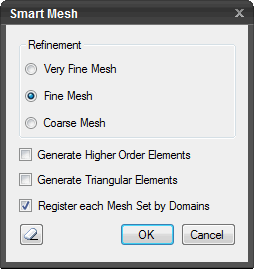
RefinementSpecify the density
of mesh to be generated. (See Note
below) Very Fine Mesh Fine Mesh Coarse Mesh
Generate Higher Order Elements Select to generate higher order elements with intermittent nodes.
Generate Triangular Elements Select to generate triangular elements.
Register each Mesh Set by Domains This option allows whether to create separate mesh sets for separate domains even though the same material properties are assigned or a single mesh set is created together for the domains having the same material properties.
Press the ESC key or
click
Note: The mesh density of Smart Mesh is defined as follows: Very Fine Mesh: The minimum element size is 0.4m, the maximum size is 3.0m, and the basic number of divisions for generating elements is 15. Fine Mesh: The minimum element size is 0.7m, the maximum size is 5.0m, and the basic number of divisions for generating elements is 10. Coarse Mesh: The minimum element size is 1.5m, the maximum size is 10.0m, and the basic number of divisions for generating elements is 5. The following outlines the method of divisions: If the divided Curve length is shorter than the minimum size, the shape will be divided close to the minimum element size. If the divided length turns out to be longer than the maximum element size, the shape will be divided close to the maximum element size. Example 1: When the divided length is shorter than the minimum size In the Fine Mesh option, if a 3m long curve is divided into 10, the division becomes 0.3m, which is longer than the minimum size of 0.7m. So the 3m length is divided by 0.7m, which becomes 4.28. Rounding off the decimal points (in order to make the division longer than the minimum), the shape is divided into 4, resulting in the element size of 0.75m. Example 2: When the divided length is longer than the maximum size In the Fine Mesh option, if a 92m long curve is divided into 10, the division becomes 9.2m, which is longer than the maximum size of 5m. So the 92m length is divided by 5.0m, which becomes 18.4. So the total length is divided into 19, resulting in about 4.84m, which is less than the maximum of 5m.
| ||||||
|
|


 Click to Reset the options to default settings.
 Click to generate mesh. The dialog box will
close automatically.
Click to generate mesh. The dialog box will
close automatically. to close the dialog box.