To define Temperature
Gradient Load for Beam
elements.
Thermal stresses are
calculated for the Beam elements on the basis of temperature difference
between the top and bottom flange of the beam and the distance separating
them.
Applicable Modules:
Tunnel
Slope
Soft
Ground
Foundation
Seepage
Dynamic
From the Main Menu,
select Loads
| Boundaries > Loads > Temperature Gradient
From the Command
Line, type 'TemperatureGradient'
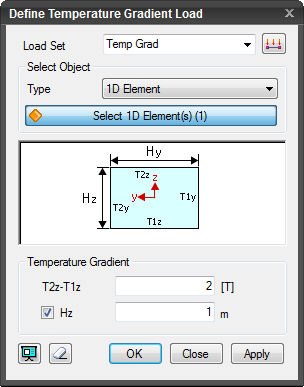
Load Set
Select the Load Set
under which the Temperature Gradient Load has to be assigned . Click
to invoke the Define Load Set dialog to Add, Modify or Delete Load Set(s).
Select
Object
Select the objects to
which the Temperature Gradient Load will be assigned.
Element
Select elements directly.
Curve
Select curves to apply
Temperature Gradient Load to the elements associated with the selected
curves.
Temperature
Gradient
Enter the nodal temperature.
T2z-T1z
Enter the temperature
difference between T2z section and T1z section.
Hz
The section data of
the selected Beam elements can be used. Un-check to specify the shortest
distance between the extremities in the element local coordinate z direction.
Click Preview to check the created Temperature
Gradient Load.
The dialog box will be initialized.
After creating the load, the dialog box will
close upon clicking.
Click the ESC key to close the dialog box.
After creating the load, the work process
will switch to the state of Select 1D Element/Curve upon clicking.


 Load Set
 to invoke the Define Load Set dialog to Add, Modify or Delete Load Set(s).
 Click Preview to check the created Temperature
Gradient Load.
Click Preview to check the created Temperature
Gradient Load.  The dialog box will be initialized.
  After creating the load, the dialog box will
close upon clicking.
After creating the load, the dialog box will
close upon clicking. Click the ESC key to close the dialog box.
 After creating the load, the work process
will switch to the state of Select 1D Element/Curve upon clicking.
After creating the load, the work process
will switch to the state of Select 1D Element/Curve upon clicking.