Arc Failure Surface
Create Circular Failure Surfaces in Slope Stability Analysis (SAM, LEM).
Applicable Modules:
Ground |
Slope |
Soft Ground |
Foundation |
Seepage |
Dynamic |


From
the Main
Menu, select Limit
Equilibrium Method > Boundaries > Arc Failure Surface 
From the Command Line, type 'CircularSurface'
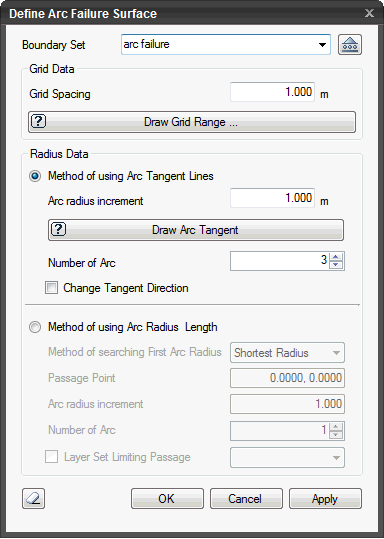 Boundary Set
Select the Boundary
Set under which the Circular Failure Surface Boundary has to be
assigned . Click  to
invoke the Define Boundary Set dialog to Add, Modify or Delete
Boundary Set(s).
to
invoke the Define Boundary Set dialog to Add, Modify or Delete
Boundary Set(s).
Grid Data
Specify the grid range within which the centers of arcs will be located.
Grid Spacing
Common spacing in both directions.
Radius Data
Specify the range of radius.
Method of using Arc Tangent Lines
Generate reference lines which will become the tangents to arcs.
Arc radius increment
Enter the increment for generating arc radius.
Number of Arc
Specify the number of incremental tangents. From the grid points, shortest lines to the tangents are generated.
Change Tangent Direction
Rotate the tangent direction by 90 degrees.
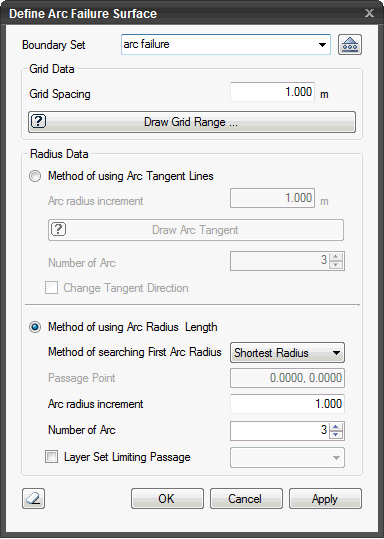
Method of using Arc Radius and Length
Specify the range of radii and length.
Method of searching First Arc Radius
Shortest Radius
Use the shortest arc radius.
Passage Point
Define a point through which the arc will pass.
Arc radius increment
Specify the increment of arc radius to be increased from the first arc radius.
Number of Arc
Specify the number of incremental tangents. From the grid points, shortest lines to the tangents are generated.
Layer Set Limiting Passage
Specify a layer set through which no arcs will be generated.
 After creating the supports, the dialog box will close upon clicking.
 Click the ESC key to close the dialog box.