Function
Define a Time-Load Function for Time History Analysis.
Applicable Modules:
Ground |
Slope |
Soft Ground |
Foundation |
Seepage |
Dynamic |


From
the Main
Menu, select Loads
| Boundaries | Analysis > Time History Analysis > Functions

From the Command Line, type 'THFunction' or 'THF'
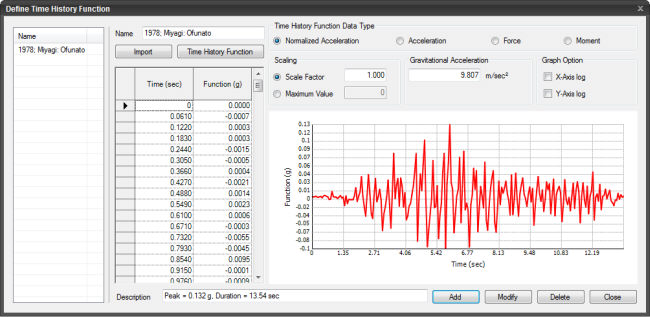
Name
Name of the Time-Load Function.
Import
Import a file containing a Time History Function.
Time History Function
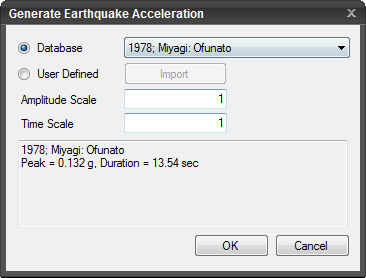
Generate Earthquake Acceleration dialog box is invoked upon clicking.
Earthquake Database
Select the earthquake acceleration from the built-in database.
User-defined
Import a data other than from the built-in database.
Amplitude Scale
An amplification factor for amplitude, the default of which is 1.
Time Scale
The default is 1.
Time History Function Data Type
Normalized Acceleration
Normalized Acceleration is obtained by dividing the acceleration spectrum by the acceleration of gravity.
Acceleration
Force
Moment
Scaling
Scale Factor
Specify a multiplier for the entered data. The default is 1.
Maximum Value
Maximum value of the Time History data.
Parameters
Gravitational Acceleration
Enter the acceleration of gravity. The default of which is 9.807m/sec^2.
Log Scale
Specify whether or not to produce graph on log scale.
X-Axis
Draw X-Axis on log scale.
Y-Axis
Draw Y-Axis on log scale.
Description
Enter a brief description of the Time History Function.
 Click to add a Time-Load Function.
 Click to modify the selected Time-Load Function.
 Click to delete the selected Time-Load Function.
 Click the ESC key to close the dialog box.
Note: The program supports the following 3 entry methods
1. Saving a frequently used time history load into a file and importing the file.
Use the method to import previously created Time History Load data. The data are saved with a '*.sgs' or '*.thd' extension and written in the following formats:
*SGSw |
File is in "Seismic Data Generator" data format, which is the SoilWorks module that auto-extracts seismic data. |
*TITLE, Elcentro 1940, N-S Component |
- |
*X-AXIS, Second |
- |
*Y-AXIS, Normalized Acceleration |
- |
*UNIT&TYPE, GRAV, ACCEL |
- |
*FLAGS, 0, 0 |
- |
*DATA |
- |
1.00000E-010, 3.50102E-001 |
- |
5.00000E-002, 3.82861E-001 |
- |
IN |
- |
1.50000E-001, 5.17459E-001 |
- |
: |
- |
Optional |
**Comments – can be entered anywhere. |
- |
*UNIT, M , N - Length: MM, CM, M, INCH, FEET, GRAV possible |
- |
*Load: KG, TON, KN, LBF, KIP |
- |
*TYPE, ACCEL - ACCEL, FORCE, MOMENT possible |
Mandatory |
*Data |
- |
X1 , Y1 (X: Period, Y: Time Function) |
- |
X2 , Y2 |
- |
X3 , Y3 |
- |
: |
2. Accessing the built-in Time History Load data in SoilWorks.
Use the feature to create Time History Loads by importing various seismic data from database.
3. Directly defining in the dialog box of Add Ground Acceleration Function/Modify/Show
Directly define Time and the corresponding Time History Loads in the table.