Flow Path
Among the seepage analysis results, generate the flow lines perpendicular to the equipotential lines.
Applicable Modules:
Ground
|
Slope |
Soft Ground |
Foundation |
Seepage |
Dynamic
|


From
the Main
Menu, select Results
> Seepage
Results > Flow Path 
From the Command Line, type 'FlowPath'
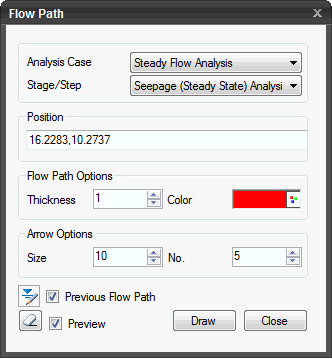
Analysis Case
Select the Analysis Case for which the flow lines will be drawn. Among the results of the selected Analysis Case, the flow lines perpendicular to equipotential lines of the total water head will be drawn.
Stage/Step
Select the (Construction) Stage/(Time) Step at which the result data needs to be checked.
Position
Directly enter the coordinate or alternatively, choose a point by locating the mouse on the model domain. Upon entering the position, the flow line passing through the coordinate will be drawn.
Flow Path Options
Thickness: Thickness of flow lines
Color: Select the color of the flow lines.
Arrow Options
Size: Specify the size of the arrow head.
No.: Specify the number of arrows to be drawn per flow line.
Previous Flow Path
Check on to maintain the previously drawn flow lines. If the option is checked off, new flow lines will be drawn at the selected positions.
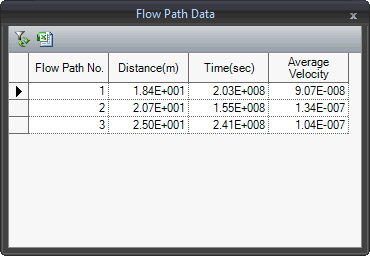
Check the Flow
Path Data  drawn. Seepage
distance, time and average speed can be checked in a table, which
can be sorted or linked to Excel.
drawn. Seepage
distance, time and average speed can be checked in a table, which
can be sorted or linked to Excel.
Preview
Check on to preview the flow line to be drawn by moving the mouse position.
 The dialog box will be initialized.
 Draw the flow line passing through the entered coordinate.
 Click the
ESC key to close the dialog box.
Click the
ESC key to close the dialog box.