Change Attribute
To change Attribute of mesh sets/elements during Construction Stages.
Applicable Modules:
Ground
|
Slope |
Soft Ground |
Foundation |
Seepage |
Dynamic |


From
the Main
Menu, select Main
> Loads
| Boundaries > Boundaries > Change Attribute 
(Seepage Module) From the Main Menu, select Main > Boundaries | Analysis >
Boundaries
> Change
Attribute
(Dynamic Module) From the Main Menu, select Main > Loads | Boundaries | Analysis
> Boundaries
> Change
Attribute
From the Command Line, type 'ChangeAttribute' or 'CA'
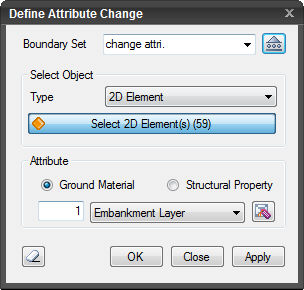 Boundary Set
Select the Boundary
Set under which the Change Attribute has to be assigned . Click
 to invoke the Define Boundary
Set dialog to Add, Modify or Delete Boundary Set(s).
to invoke the Define Boundary
Set dialog to Add, Modify or Delete Boundary Set(s).
Select Object
Select the objects to which the Attribute Change Boundary Set will be assigned.
Attribute
Ground Material
Select in case of changing the properties of ground elements (Selection switches to 2D elements).
Structural Property
Select in case of changing the properties of structural elements (Selection switches to 1D elements).
Note: Select
the property to be changed consistent with the object selection
method. Boundary Set can be created only when the properties attribute
before the change is identical to that after the change. For
example, if the changing objects are structural elements, then
the attribute after the change must be of Structural Property.
Click  to Add,
Modify or Delete Ground
Material Property (Structural
Property).
to Add,
Modify or Delete Ground
Material Property (Structural
Property).
 The dialog box will be initialized.
 After creating the boundary condition, the dialog box will close
upon clicking.
After creating the boundary condition, the dialog box will close
upon clicking.
 Click the ESC key to close the dialog box.
 After creating the boundary condition, the work process will switch
to the state of Select Element upon clicking.
After creating the boundary condition, the work process will switch
to the state of Select Element upon clicking.
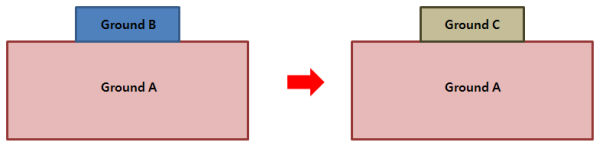
Note: The diagrams below show that the ground layers are originally consisted of A and B, and the Ground Material Property changes from B to C during Construction Stages. In such a case, the change in the ground condition is reflected by Change Attribute rather than creating additional elements.
An example may be the case of Shotcrete being cured in Construction Stages in Tunnel Analysis.