Search
automatically where model is required to be reviewed geometrically.
▒Call
[Member]
Tab > [Tool]> [Check
Model]
▒ Detail Description
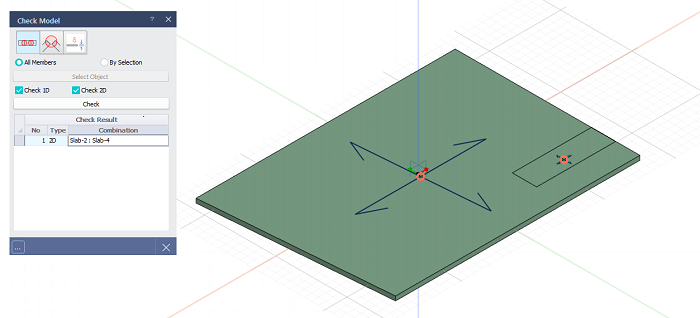
Duplicate
Member Check
Search
the location members are duplicated.
All
Members:
Check all members.
By Selection:
Check selected members.
Check
1D:
Check 1D members. (Beam, Sub Beam, Column, Sub
Column and Brace)
Check
2D:
Check 2D members (Wall, Slab, Plate and Shell)
Check Result
-
Type :Display
the member type of duplicated member.
- Combination :
Display member type and ID of duplicated member.
- Display
corresponding member by double clicking the list.
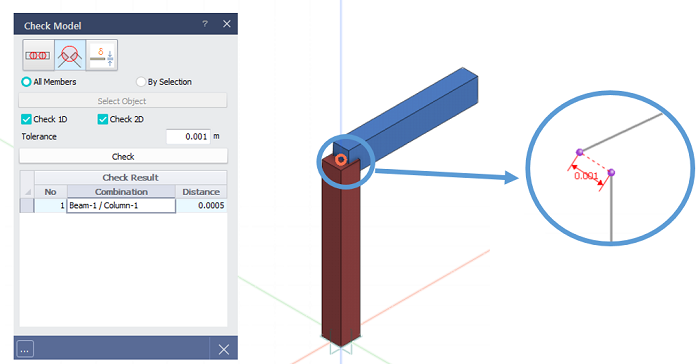
Check
Mergeable Points
Tolerance
: Enter
the tolerance value to find the distance between
two mergeable points. If it is defined as 0.001mm,
two points within 0.001mm distance are found.
Check Result
-
Combination :Display
member type and ID of mergeable members.
- Distance :
Display the distance between two points.
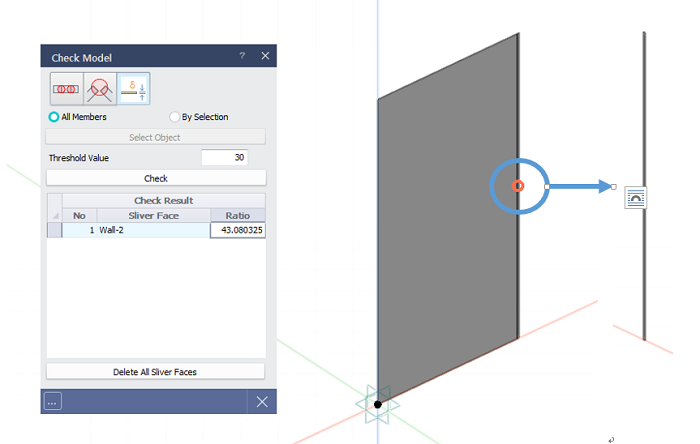
Check
Silver Face
Threshold
Value
: Enter the threshold value of shape ratio
of 2D member.
- For
any shape, equation (Perimeter^2/(4πArea)
is
used. For circular shape, the ratio becomes 1
and it increases as the Aspect Ratio increases Example
: