Check Deflection

Check deflection of Beam, Column and Brace with respect to user defined limit for specific Load Set and Load Combinations. This function does not cover Plate, Sub Beam and Sub Column.


¢Æ Call

[Results] Tab > [Analysis Results] Category > [System Check] > [Deflection Check]


¢Æ Detail Description

61._Check_Deflection-1.png

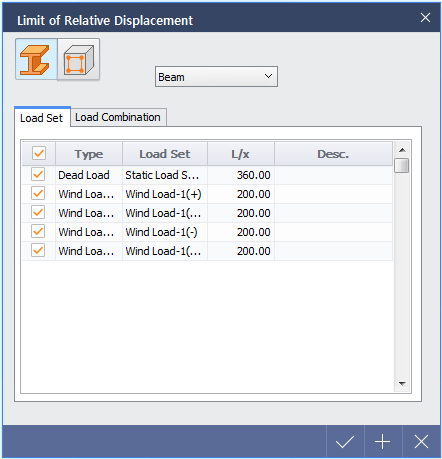
< Limit of Relative Displacement Dialog >


Limit of Relative Displacement

Blue_Square.gifSelect Steel / RC : Load Set, Load Combination and Deflection limit can be defined separately according to material properties. If there are no additional settings, default values of defection limit will be used.


Blue_Square.gifSelect Member Type : Load Set, Load Combination and Deflection limit can be defined separately according to Member Type. If there are no additional settings, default values of defection limit will be used.


Blue_Square.gifLoad Set : ±â´É ½ÇÇà½Ã ÁöÁøÇÏÁßÀ» Á¦¿ÜÇÑ ¸ðµç Load SetÀÌ »ó´ëº¯À§ÀÇ °ËÅä ´ë»óÀÌ µË´Ï´Ù. »ó´ëº¯À§ °ËÅ並 ¿øÇÏÁö ¾Ê´Â Load SetÀº üũ ÇØÁ¦ÇÕ´Ï´Ù. °¢°¢ÀÇ Load Set¸¶´Ù ¼³Á¤µÈ º¯À§ Á¦ÇÑÄ¡ (L/x)´Â Á¶Á¤ÀÌ °¡´ÉÇϸç, ÃʱⰪÀº Dead Load TypeÀÇ Load SetÀº 360, ±× ¿ÜÀÇ ÇÏÁß TypeÀº 200ÀÔ´Ï´Ù.


Blue_Square.gifLoad Combination : Select specific Load Combination to check the deflection results.


Tool Bar

61._Check_Deflection-3.jpg


Blue_Square.gifAll : Display analysis results of all members in table format.

Blue_Square.gifSel : Display the table of analysis results of selected members only in table format.

Blue_Square.gifBy Member / By Design Group : By Member¸¦ ¼±ÅÃÇÒ °æ¿ì ¸ðµç ºÎÀçÀÇ º¯À§ °á°ú¸¦ °ËÅäÇϸç, By Design GroupÀ» ¼±ÅÃÇÒ °æ¿ì Design Group ³»¿¡ ¼ÓÇÑ ´Ù¼öÀÇ Member ÀÇ º¯À§¸¦ °Ë»öÇØ ÃÖ´ë°ªÀ» Å×À̺í·Î ±¸¼ºÇÕ´Ï´Ù.

Blue_Square.gifAnalysis for Desing-1 (ÇØ¼® Case ¼±ÅÃ) : ¿©·¯ °³ÀÇ ÇØ¼® Case°¡ Á¸ÀçÇÏ´Â °æ¿ì, °á°ú¸¦ È®ÀÎÇÒ ÇØ¼® Case¸¦ ¼±ÅÃÇÕ´Ï´Ù.

Blue_Square.gifAll Load Set/Combo : Load Set ¹× Load Combination¿¡ ´ëÇÑ ¸ðµç °á°ú¸¦ È®ÀÎÇϰųª, ÀϺθ¸ Table·Î ±¸¼ºÇÒ ¼ö ÀÖµµ·Ï ¼³Á¤ÇÏ´Â ¿É¼ÇÀÔ´Ï´Ù.

Blue_Square.gifAll Positions / Max L/x : All Positions¸¦ ¼±ÅÃÇÒ °æ¿ì ºÎÀ縦 ÃÑ 4µîºÐÇÏ¿© 5°³ÀÇ À§Ä¡¿¡¼­ ¹ß»ýÇÑ º¯À§¸¦ Table·Î ±¸¼ºÇÕ´Ï´Ù. Max L/x¸¦ ¼±ÅÃÇÒ °æ¿ì 5°³ÀÇ À§Ä¡ Áß °¡Àå º¯À§°¡ Å« À§Ä¡ÀÇ °ªÀ» Table·Î ±¸¼ºÇÕ´Ï´Ù.

Blue_Square.gifLimit : Define the default values in Limit of Relative Displacement dialog.


Table Composition


61._Check_Deflection-4.png


ºÎÀçÀÇ ±æÀÌ¿¡ X, Y, Z¹æÇâÀÇ º¯À§°ªÀ» Áß °¡Àå Å« °ªÀ» ³ª´« L/x °ª°ú Limit of Relative Displacement¿¡¼­ ¼³Á¤ÇÑ Á¦ÇÑÄ¡¸¦ ºñ±³ÇÏ¿©, Á¦ÇÑÄ¡º¸´Ù Å« °ªÀ̸é OK, ÀÛÀº °ªÀ̸é NGó¸®ÇÕ´Ï´Ù.

Top_Button.gif