Point Spring
Enter spring boundary condition at both ends of line member(1D) or point body(0D).
▒ Call
|
[BC & Mass] Tab > [Spring] > [Point Spring] Work Tree [Analysis] Tab > [Spring] > Right-Click > [Add Point Spring]
Work Tree [Analysis] Tab > [Spring] > [Spring Set] > [Point Spring] > [List] > Right-Click > [Modify], [Delete] |

▒ Detail Description
|
< Point Spring Dialog > |
|
|
Property |
|
|
Select property of spring boundary condition. Click |
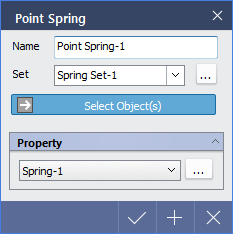
 to access Spring Set dialog.
|
|
